Data viewer
View jobs from your feed, verify receipt, and check processing status.
Overview
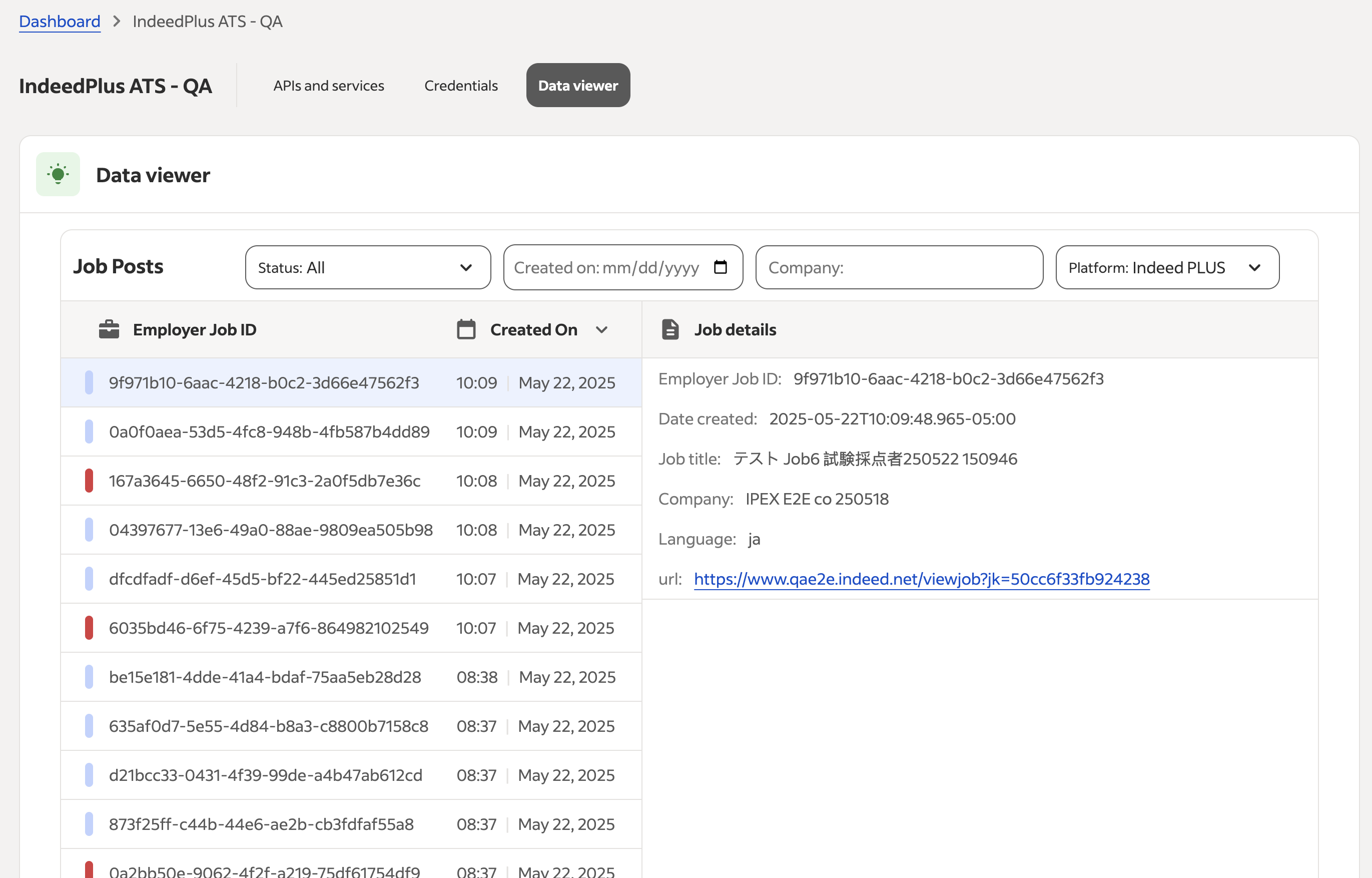
The Data viewer helps you build Job Sync API integrations. Use it to view jobs from your feed, confirm that Indeed received them, and check their processing status. Access the Data viewer through Partner Console.
Who can access the tool
Only partners in Japan who set up a Job Sync integration in Partner Console can access the Data viewer.
Key features and functionality
- Job feed visibility: View all jobs that Indeed receives from your feed, including job IDs and job titles.
- Processing status: See each job's status in the Indeed pipeline.
- Accepted: Indeed processed and accepted the job.
- Rejected: Indeed did not accept the job. The tool does not show the reason.
- Pending: Indeed received the job but has not processed it yet.
- Filtering and search: Filter jobs by date, company, or status.
- Integration type toggle: Switch between jobs posted to Indeed and Indeed PLUS. Acceptance rules can differ between these options.
- Simple interface: Access the tool easily through Partner Console.
How and when to use the tool
Use the Data viewer while you develop and set up your job feed integration to confirm that Indeed receives your jobs correctly. You can also use it for ongoing monitoring, but the tool is intended for setup.
Limitations and known issues
- Only partners in Japan with Job Sync integrations can use the Data viewer.
- The tool does not show specific reasons for job rejection.
- The Data viewer is intended for setup, but you can also use it for ongoing monitoring.
- The Data viewer does not show HTTP logs or expired jobs.
Frequently asked questions
Use the filtering options to view jobs by company, date, or status.
Indeed limits Data viewer access to partners in Japan with Job Sync integrations. If you believe you should have access, contact your Indeed representative.
Rejected in the Data viewer means Indeed received the job but it failed moderation.
Contact your Client Success team for guidance. The Data viewer does not show specific rejection reasons.
Switching the integration type changes which jobs Indeed rejects, because moderation rules differ between Indeed and Indeed PLUS. Indeed might reject a job for Indeed PLUS but accept it for Indeed. In that case, the job appears on the Indeed website but is not eligible for Indeed PLUS features.
The Data viewer does not show expired jobs.
The Data viewer does not show HTTP logs. It shows only the moderation status of jobs you posted successfully.