Job description formatting
Write job descriptions in HTML.
By using this API and its documentation and building an integration, you agree to the Additional API Terms and Guidelines.
Overview
By default, Indeed treats job descriptions as plain text. To use richer formatting, provide the description in HTML.
Indeed normalizes supported HTML and renders it in a standard format for job seekers. HTML that does not follow these guidelines can be rejected or formatted incorrectly:
-
Use only supported HTML tags and computed style nodes.
-
Escape quotes in HTML:
<font style=\"font-weight:bold\">Some bold text</font> -
Use literal characters such as
<instead of<. HTML entities can cause rejection or incorrect formatting.
To use an HTML job description, set these fields in SourcedJobPostingBodyInput:
| Field | Type | Description |
|---|---|---|
description | String! | Required. The job description shown to job seekers. Maximum 65,000 bytes (1 byte for ASCII, 2 to 3 bytes for other characters). It must match |
descriptionFormatting | SourcedJobPostingFormattingType! | Description format. If the client uses HTML formatting on its job list or job details pages, Indeed policy generally requires HTML for XML and API jobs unless there is a reasonable explanation for not including it. Using HTML helps the job appear as closely as possible to the client version. Poor formatting can lead to complaints from clients and job seekers. To provide the job description in HTML, set this field to Default: |
HTML tags
| Tag | Description |
|---|---|
<b> | Bold text. |
| Header. Text in header tags appears in consistent sizes on Indeed. |
<br> | Single line break. |
<p> | Paragraph. Indeed automatically inserts an empty line between paragraph tags. |
<ul> | Unordered, or bulleted, list. |
<li> | List item. |
<strong> | Strong, or bold, text. |
<em> | Emphasized, or italicized, text. |
| Simple table. |
Computed style nodes
| Node | Description |
|---|---|
| Bold text. |
| Inline text. By default, |
The <p> tag has positive top and bottom margins and padding by default. Do not override this.
Example
This example creates a job posting with an HTML description:
mutation{ jobsIngest { createSourcedJobPostings(input: { jobPostings: [ { body: { title: "Accounting work for paper processing company" subtitle: "Full-time from 10am to 3pm." description: "<h2>Job description</h2>【POINT】<div><br/>You can use your office experience from any industry. <br/><br/>[Job details]<br/>・Organizing documents<br/>・Answering telephones<br/>・Responding to visitors<br/><br/>[Working environment]<br/>Our company was established in 1955.<br/>We deliver high-quality paper products.<br/><br/>As our business expands, we seek part-time workers to handle accounting work. <br/>We are creating an environment where we can grow together. <br/></div>" descriptionFormatting: "RICH_FORMATTING" } metadata: {} }] }) { results { jobPosting { sourcedPostingId } } } }}For Japan partners
Job descriptions in Japan have these additional requirements:
- Set
descriptionFormattingtoRICH_FORMATTING. - Define segments for different parts of the job description.
Segments
A segment describes one part of the job, such as working hours, holidays, or work location. Each segment uses a header tag and a content tag at the same level in the HTML hierarchy. Add inner text to every header and content tag. For example:
<h2 data-segment-type=\"header\" data-segment-label=\"JobDescription\">Job Description</h2><div data-segment-type=\"content\" data-segment-label=\"JobDescription\">Hiring crane operators!</div>Segment tags use these attributes:
| Attribute | Description | Examples |
|---|---|---|
data-segment-type | Whether the tag is a header or content. Required on every segment tag. |
|
data-segment-label | The segment content type. Required on every segment tag. Use the same value on both the header and content tags. Indeed treats unsupported values as See Segment labels. |
|
Segment labels
Indeed supports these data-segment-label values:
| Value | Description |
|---|---|
JobDescription | The job role. Exclude benefits and working hours. |
Qualification | Candidate requirements and preferences that comply with the law. Include any required certificates. Do not restrict age or gender unless the law allows it. If you do, include the reason. |
WorkHours | Working hours and shifts. Include duration, break times, and shift schedules.
|
Holidays | Days off, PTO, holidays, and vacation policies. Include weekend details. |
WorkLocation | The work location. Include remote-work and transfer options, if applicable. Put commute details in |
CommuteInfo | Commute information. Include public transport options, nearest stations, and distances. |
Pay | Pay details. Include base salary, bonuses, promotions, severance pay, commute fees, overtime pay, and commissions.
Put pay examples in |
SalaryExample | Pay examples. |
Benefits | Benefits such as company dormitories, services, reward systems, and social insurance. |
WorkEnvironment | The working environment, such as employee count and gender and age ratios. |
ApplyMethod | Application methods, such as phone applications. Indeed Apply is the standard method on Indeed PLUS. Phone applications might become non-standard. |
ApplyInfo | Hiring process details, such as interview count and locations. |
EmployerMessage | Additional details to attract candidates, such as company culture and vision. |
Other | Other details. This is the default for unsupported |
Segment examples
This example calls createSourcedJobPostings with description set to a segmented HTML description:
mutation{ jobsIngest { createSourcedJobPostings(input: { jobPostings: [ { body: { title: "Accounting work for paper processing company" subtitle: "Full-time from 10am to 3pm." description: "<h2 data-segment-type=\"header\" data-segment-label=\"JobDescription\">Job description</h2><div data-segment-type=\"content\" data-segment-label=\"JobDescription\">【POINT】<br/>You can use your office experience from any industry.<br/><br/>[Job details]<br/>・Organizing documents<br/>・Answering telephones<br/>・Responding to visitors<br/><br/>[Working environment]<br/>Our company was established in 1955.<br/>We deliver high-quality paper products.<br/><br/>As our business expands, we seek part-time workers to handle accounting work.<br/>We are creating an environment where we can grow together.<br/></div>" descriptionFormatting: "RICH_FORMATTING" } metadata: {} }] }) { results { jobPosting { sourcedPostingId } } } }}The next examples show correct and incorrect segment formatting. These examples do not escape quotes for readability. Escape quotes when you enter HTML into description.
<h2 data-segment-type="header" data-segment-label="JobDescription"> Job Description</h2><div data-segment-type="content" data-segment-label="JobDescription"> Hiring crane operators!</div><h2 data-segment-type="header" data-segment-label="Qualification"> Requirements</h2><div data-segment-type="content" data-segment-label="Qualification"> The class B crane operator's certificate is required for this job.</div><h2 data-segment-type="header" data-segment-label="WorkLocation"> Work Location</h2><div data-segment-type="content" data-segment-label="WorkLocation"> Ichikawa (as a dispatch employee) and other locations</div><h2 data-segment-type="header" data-segment-label="WorkHours"> Length of Service</h2><div data-segment-type="content" data-segment-label="WorkHours"> <ul> <li>At least 3 months</li> <li>5 days per week</li> <li>8 hours per day</li> </ul> <p> We want to be as flexible for employees as possible, so please make a request such as "Would love to take a day off on Monday" or "Would love to work hard and earn more money." </p></div><h2 data-segment-type="header" data-segment-label="Benefits"> Benefits</h2><div data-segment-type="content" data-segment-label="Benefits"> <ul> <li>Social insurance</li> <li>Commute fee</li> <li>Uniform provided</li> <li>Chance of pay increase</li> <li>Daily wage</li> </ul></div><h2 data-segment-type="header" data-segment-label="ApplyMethod"> How to Apply</h2><div data-segment-type="content" data-segment-label="ApplyMethod"> Apply for this job through a phone call or the application form on the website. Bring your resume to the interview.</div>Result:
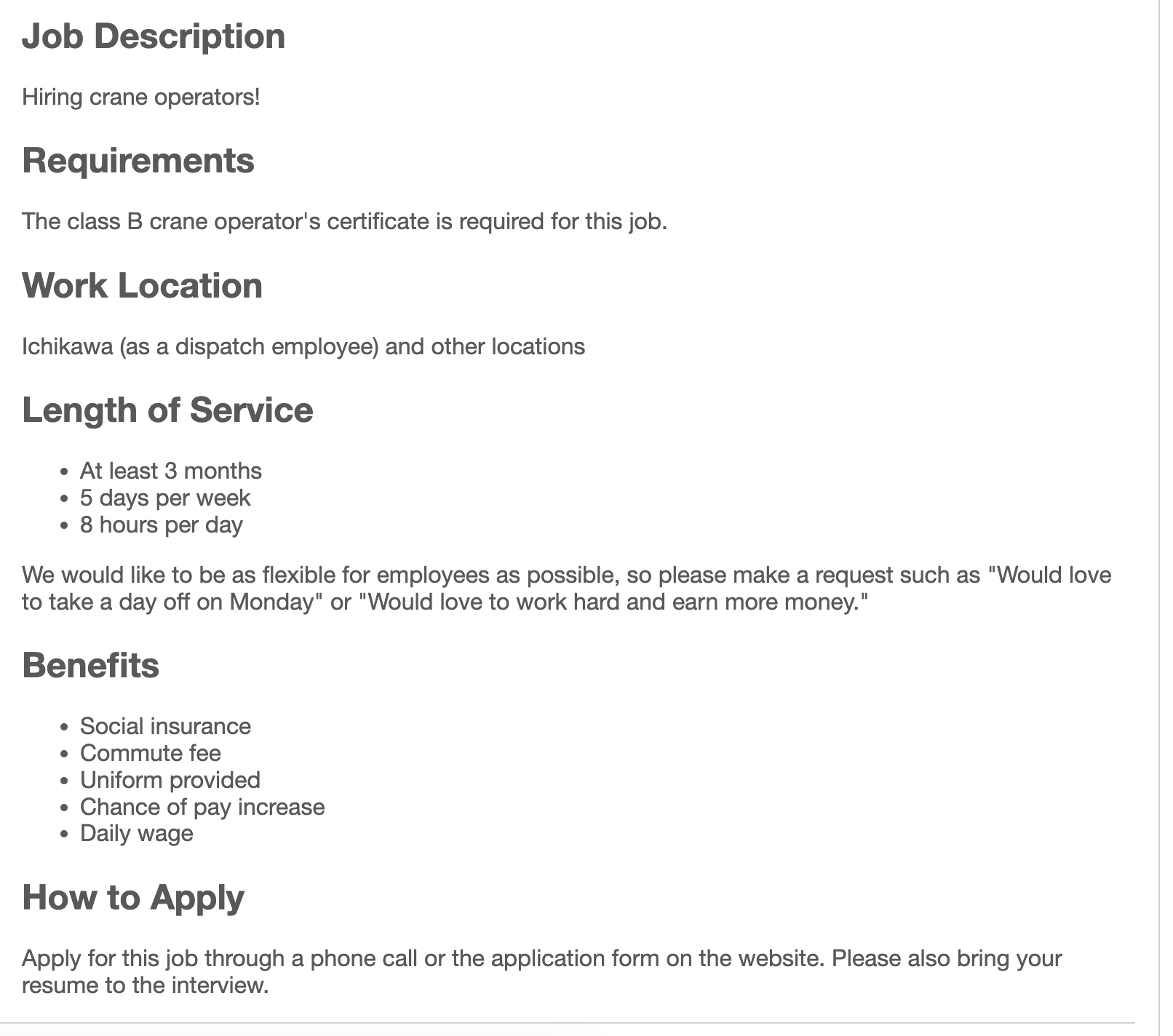
Incorrect: the segment tags are missing required attributes.
<h2> Job Description</h2><div> Hiring crane operators!</div>To correct: put the inner text in segment tags, which are HTML tags with the data-segment-type and data-segment-label attributes.
You can also put text in non-segment tags as long as you nest them inside a segment.
Here, "Hiring crane operators!" is in a non-segment tag nested inside a <div> with the correct segment attributes.
<h2 data-segment-type="header" data-segment-label="JobDescription"> Job Description</h2><div data-segment-type="content" data-segment-label="JobDescription"> <ul> <li>Hiring crane operators!</li> </ul></div>Incorrect: the inner <h2> and <div> have the required attributes, but the outer <div> contains text without them.
<div> This fails. <h2 data-segment-type="header" data-segment-label="JobDescription"> Job Description </h2> <div data-segment-type="content" data-segment-label="JobDescription"> Hiring crane operators! </div></div>To correct: add the required attributes to the outer <div>.
Correct: the outer <div> contains no text.
<div> <h2 data-segment-type="header" data-segment-label="JobDescription"> Job Description </h2> <div data-segment-type="content" data-segment-label="JobDescription"> Hiring crane operators! </div></div>Incorrect: this example uses an unsupported data-segment-type.
<h2 data-segment-type="unsupportedType" data-segment-label="JobDescription"> Job Description</h2><div data-segment-type="unsupportedType" data-segment-label="JobDescription"> Hiring crane operators!</div>To correct: set data-segment-type to header or content.
Incorrect: the segments are missing data-segment-label attributes.
<h2 data-segment-type="header"> Job Description</h2><div data-segment-type="content"> Hiring crane operators!</div>To correct: add data-segment-label attributes.
Incorrect: this example uses an unsupported label.
<h2 data-segment-type="header" data-segment-label="LabelThatDoesNotExist"> Job Description</h2><div data-segment-type="content" data-segment-label="LabelThatDoesNotExist"> Hiring crane operators!</div>To correct: set data-segment-label to a segment label. Indeed treats unsupported values as Other.
Incorrect: these segments have no inner text.
<h2 data-segment-type="header" data-segment-label="JobDescription"></h2><div data-segment-type="content" data-segment-label="JobDescription"></div><h2 data-segment-type="header" data-segment-label="JobDescription"/><div data-segment-type="content" data-segment-label="JobDescription"/>To correct: add inner text to the segments.
Incorrect: a header segment with the Benefits label follows a header segment with the JobDescription label.
<h2 data-segment-type="header" data-segment-label="JobDescription"> Job Description</h2><h2 data-segment-type="header" data-segment-label="Benefits"> Benefits</h2>To correct: add a content segment after the header segment with the same data-segment-label value.
Incorrect: there is no header segment.
<div data-segment-type="content" data-segment-label="JobDescription"> Hiring crane operators!</div>To correct: add a header segment.
Incorrect: the content segment is nested in a <div> at a different level than the header segment.
<h2 data-segment-type="header" data-segment-label="JobDescription"> Job Description</h2><div> <div data-segment-type="content" data-segment-label="JobDescription"> Hiring crane operators! </div></div>To correct: put the header segment and content segment at the same HTML hierarchy level.