- Prerequisites
- Configure OAuth
- OAuth v2 token scopes
- Get OAuth access token
- Campaign management guides
- Get campaign budget quote
- Create single-use campaign
- Create an objective-based campaign
- Create a recurring campaign
- Update recurring campaign information
- Update campaign budget
- Update campaign duration
- Get details for jobs in campaign
- How-to guides for reports
- Report on campaign performance
- How-to guides for account management
- Get employer account information
- Get subaccount information
- Create a subaccount
- Get an account budget
- Set an account budget
- How-to guides for API quota usage
- Get advertiser's API quota usage
- Recommendations and guidelines
- Prepare for eventual consistency
- Ensure compatibility with API changes
- FAQs and troubleshooting
- FAQs
- Troubleshoot common errors
- Troubleshoot OAuth errors
Sponsored Jobs API get started
Get started with the Sponsored Jobs API.
Unless you have a written agreement with Indeed regarding your use of Indeed's APIs, by using this API or its documentation, you agree to apply the Indeed API Terms and the Additional API Terms and Guidelines to your use of Indeed's APIs.
-
2026-01-08:
Sponsored Jobs API usage policy: as of 2026-02-01, per-call charges apply in these markets:
- EU markets and Switzerland (AT, BE, CH, DE, DK, EE, ES, FI, FR, GR, IE, IT, LU, NL, PL, PT, RO, SE): 3 EUR, or the equivalent in the advertiser's billing currency.
- Other markets (AR, AU, BR, CA, CL, CO, CR, GB, ID, IN, MX, MY, NZ, PA, PH, SG, TH): 3 USD, or the equivalent in the advertiser's billing currency.
Fees apply only when your monthly Sponsored Jobs campaign spend is less than your monthly API call cost.
The policy applies to all paying Sponsored Jobs API customers except users of Indeed's proprietary ATS plugin.
Eligibility: You can use the Sponsored Jobs API only if you sponsored a job in the last three calendar months.
Monthly call limit: The maximum is the greater of:
- Your previous month's Sponsored Jobs campaign spend.
- Your credit limit.
Monitor your usage: Call
/apiquotausageto retrieve your current month's API usage.For recommended API usage patterns, see Sponsored Jobs API best practices to reduce call volume.
-
2026-01-08:
Sponsored Jobs API usage policy (US): as of 2024-12-01, Sponsored Jobs API customers pay for API usage based on their sponsorship spend. The policy does not apply to users of Indeed's proprietary ATS plugin.
For recommended API usage patterns, see Sponsored Jobs API best practices to reduce call volume.
-
Effective 2024-06-30: the
GET /v1/stats/datastatusendpoint is decommissioned and returns HTTP404. UseGET /v1/statsinstead. -
Effective 2024-06-26: the
GET /v1/campaigns/:campaignId/stats/:dateandGET /v1/campaigns/:campaignId/stats/entryDatesendpoints are decommissioned and return HTTP404.Use
GET /v1/campaigns/{campaignId}/statsinstead. -
Effective 2024-06-26: the
perPageparameter forGET /v1/campaignsis capped at500. Requests with a higher value are rejected as invalid. -
Sunset of Sponsored Jobs legacy API:
2021-08-01: migrate to the latest Sponsored Jobs API gateway, which uses the Indeed OAuth v2 endpoint and runs on infrastructure with higher availability and lower latency.
2022-01-01: the Sponsored Jobs legacy API was sunset.
2022-03-31: the Sponsored Jobs XML integration was sunset.
Review prerequisites, how-to guides with examples, FAQs, and troubleshooting.
Prerequisites
Configure OAuth
Before you use the Sponsored Jobs API, you need:
- An Indeed account
- Your API client ID and secret
- Jobs in your Indeed account that are available to sponsor
- The employers associated with your account
| OAuth | Description |
|---|---|
| 2-legged OAuth | The examples in this guide use the client credentials flow (2-legged OAuth). Use this flow if you are a direct employer, agency, or programmatic partner. If you are an agency or programmatic partner acting for an employer, Indeed recommends that the employer add your Indeed account as a secondary user. This lets you use the client credentials flow. To get your client ID and secret, register your 2-legged OAuth app in the Partner Console. If you cannot access the console, contact your Indeed representative or marketplacesupport@indeed.com. |
| 3-legged OAuth | ATS partners must use the authorization code flow (3-legged OAuth). When you become an Indeed partner, Indeed creates an app for your integration. Sign in to Partner Console to view the app and your OAuth credentials: client ID, secret, and a 3-legged OAuth authorization code. Exchange those credentials for an access token to authenticate API calls. |
OAuth v2 token scopes
You must request at least one scope when you get an access token.
- A write scope includes the matching read-only scope. For example,
employer.advertising.campaignalso includesemployer.advertising.campaign.read. - You can request multiple scopes in one access token. See the Glossary. Separate them with spaces. For example:
employer_access employer.advertising.campaign employer.advertising.campaign_report.read
In your OAuth authorization code request, include the scopes for the API endpoints you want to call. The end user can grant none, some, or all of them. See the Glossary.
See:
Get OAuth access token
To call oauth/v2/tokens and get an access token, request the token for the API you want to use.
Most Sponsored Jobs API endpoints require an access token that represents an employer. Request employer_access in addition to the scopes required by the endpoints you plan to call, and include the employer parameter to specify the employer whose data you want to access.
If you have a master account and call a subaccount management endpoint, omit the employer parameter when requesting the access token.
You can call the subaccount management endpoint through either:
GET /v1/subaccountsPOST /v1/subaccountsAPI details for tokens endpoint
| API URL | https://apis.indeed.com/oauth/v2/tokens |
|---|---|
| Request type | POST |
| Content type | application/json |
| Authentication | None |
Request parameters for the tokens endpoint
| Key | Value |
|---|---|
client_id | Client ID. Get it from:
|
client_secret | Client secret. Get it from:
|
grant_type | client_credentials |
scope | Depends on the endpoints you call. For example, |
employer | Your employer account ID. |
Sample response for tokens endpoint
{ "access_token": "<access_token>", "scope": "employer.advertising.account.read employer_access", "token_type": "Bearer", "expires_in": 3600}Campaign management guides
Get campaign budget quote
Lets employers get recommended daily budgets for each job and a campaign-level average daily budget before creating an average daily budget (ADB) campaign.
Returns the average budget quote for the sponsorship plan, a budget quote for each matched job, and recommendations for the STANDARD and PREMIUM tiers.
The recommended daily budget is a target, not a guarantee. Indeed optimizes toward it, but actual daily spend can vary.
For example, if the average daily budget is $25, spend might be $20 on day 1 and $30 on day 2.
Calls to this endpoint are not charged under the Sponsored Jobs API usage policy.
- Wait 2 to 3 hours after posting new jobs before creating a campaign.
- Create the campaign within 1 hour of the budget recommendation call. After that, market conditions can change, and campaign creation uses the latest recommended budgets.
- Jobs added automatically through query-based job resolution, including after campaign creation, use their recommended budgets as the default daily spend.
- Jobs added manually to a campaign also use their recommended budgets as the default daily spend.
This example gets recommended daily budgets for each job and the campaign-level average daily budget.
-
Get recommended daily budgets for each job and the campaign-level average daily budget.
API details:
Get campaign budget quote API URL https://apis.indeed.com/ads/v1/campaignbudgetquoteRequest type POSTContent type application/jsonAuth OAuth 2.0 bearer token Sample request:
curl -L -X POST 'https://apis.indeed.com/ads/v1/campaignbudgetquote' \-H 'Content-Type: application/json' \-H 'Accept: application/json' \--data-raw '{"jobsQuery": "title:\"financial analyst\" AND city:(toronto OR \"new york\")","jobsTitle": "Healthcare Intern","jobsCompany": "Indeed","jobsLocation": "Austin, TX","jobsLocationRadius": 25,"jobsSourceId": "8977ac341a3c4527","jobsSourceName": "CompanyABC","jobsToInclude": "ALL"}'Sample response:
{"meta": {"status": 200,"errors": [{"type": "RESOURCE_NOT_FOUND","description": "Couldn't locate the requested resource"}],"rootLocation": "https://apis.indeed.com/ads","perPage": 25,"links": [{"rel": "next","href": "/v1/campaigns/3141592653589793"}]},"data": {"sponsorshipPlanBudgetQuotes": [{"sponsorshipPlan": "PREMIUM","dailyAvgBudgetPerJob": {"amount": 0,"currency": "string"},"jobBudgetQuotes": [{"jobKey": "89deb9de58ebe149","dailyBudget": {"amount": 0,"currency": "string"}}]}]}}
Create single-use campaign
Prerequisites
- Wait 2 to 3 hours after posting new jobs before creating a campaign.
- Your employer account must be associated with a job source before you create a campaign. Use
GET /v1/accountto list the job sources for your account. If none are associated, contact Indeed Customer Support. - Your employer account must have valid billing information before the campaign can sponsor jobs.
This example creates a single-use campaign that runs for two weeks and sponsors jobs in two locations with a $500 budget.
-
Use an access token with the required scopes.
Create single-use campaign scope employer_access employer.advertising.campaign -
Get the job source ID.
To find the job source ID, see get employer account information. An employer can have more than one job source ID, one for each website or domain. Use
jobSourceList.idfor the site you want. -
Create the single-use campaign.
API details:
API details for single-use campaign API URL https://apis.indeed.com/ads/v1/campaignsRequest type POSTContent type application/jsonAuth OAuth 2.0 bearer token Sample request:
{"name": "Test Campaign Single-use","status": "PAUSED","trackingToken": "MyTrackingToken","jobsSourceId": "[Your jobsSourceId from Step 2]","jobsToInclude": "QUERY","jobsQuery": "city:Aberdeen OR city:Glasgow","budgetOnetimeLimit": 500,"startDate": "2021-09-01","fixedEndDate": "2021-09-15"}Sample response:
{"meta": {"status": 201,"errors": null,"rootLocation": "https://apis.indeed.com/ads","perPage": null,"links": [{"rel": "Campaign Info","href": "/v1/campaigns/c8bxxxxxxxxx449"}]},"data": {"campaignId": "c8bxxxxxxxxx449"}} -
View the campaign in Indeed.
API call:
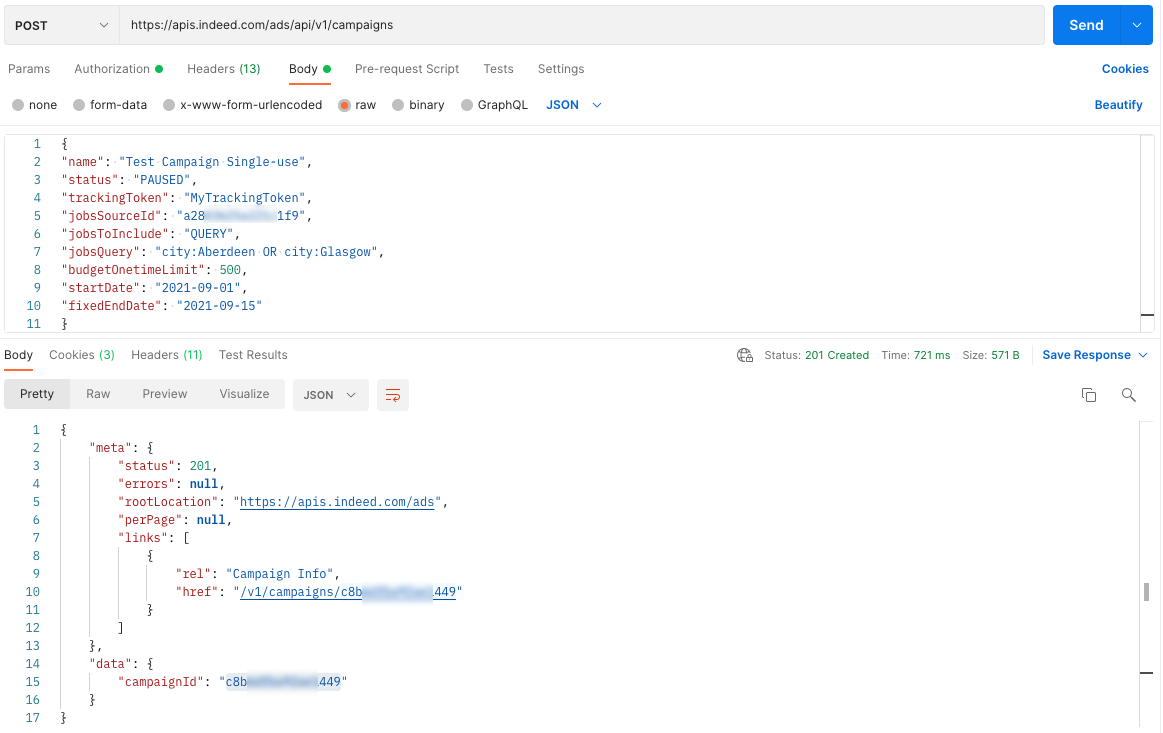
API call to create a campaign Campaign created in Indeed:
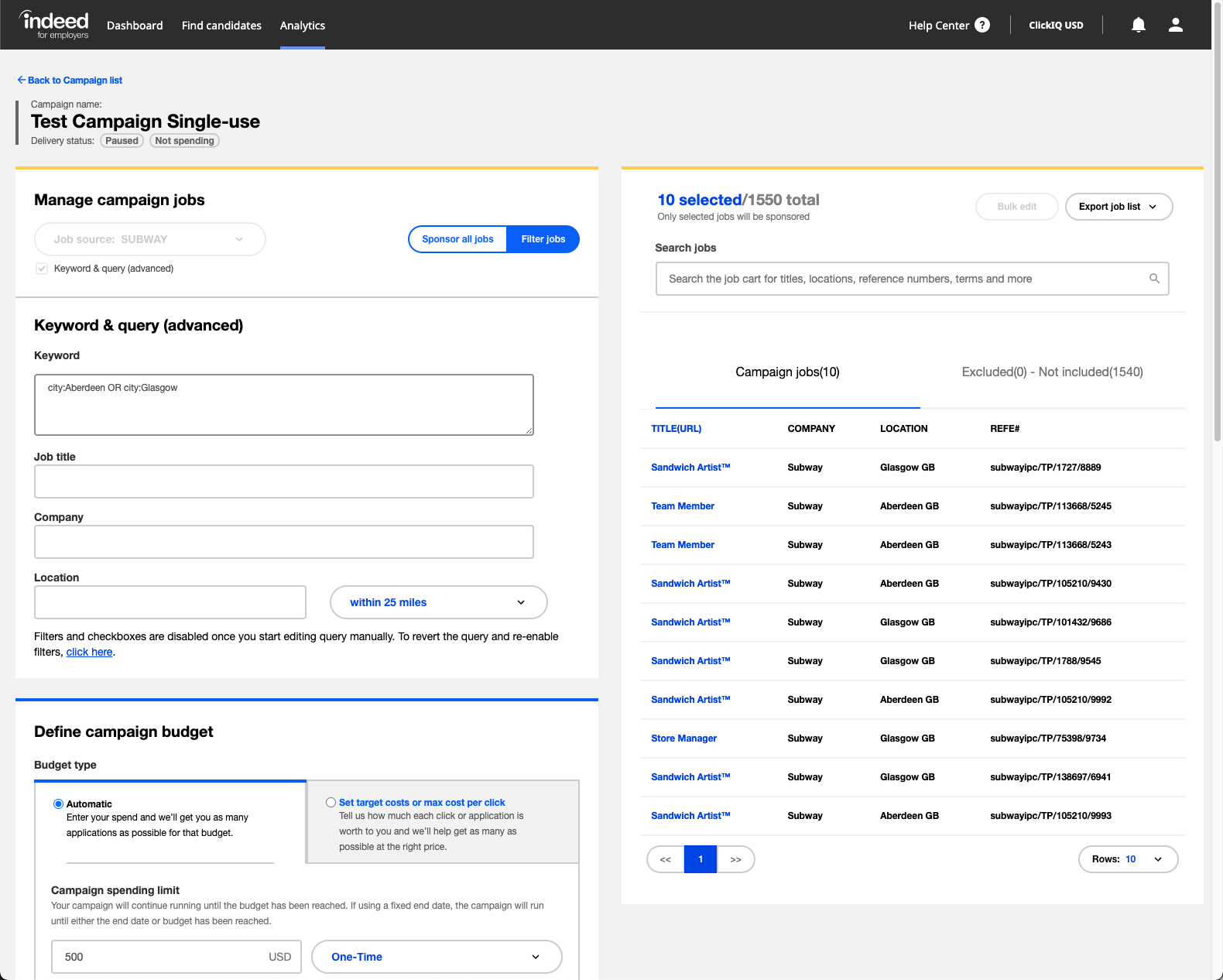
Single-use campaign created on Indeed
Create an objective-based campaign
Prerequisites
- Wait 2 to 3 hours after posting new jobs before creating a campaign.
- Your employer account must be associated with a job source before you create a campaign. Use
GET /v1/accountto list the job sources for your account. If none are associated, contact Indeed Customer Support. - Your employer account must have valid billing information before the campaign can sponsor jobs.
This example creates an objective-based campaign that targets a specific number of scheduled interviews.
You cannot set or change objectives for average daily budget (ADB) campaigns. All other Sponsored Jobs API campaigns must have an objective.
-
Use an access token with the required scopes.
Create an objective-based campaign scope employer_access employer.advertising.campaign -
Get the job source ID.
To find the job source ID, see get employer account information. An employer can have more than one job source ID, one for each website or domain. Use
jobSourceList.idfor the site you want. -
Create the interview objective campaign.
API details:
Create interview objective campaign API URL https://apis.indeed.com/ads/v1/campaignsRequest type POSTContent type application/jsonAuth OAuth 2.0 bearer token Sample request:
{"name": "XXX SCHEDULED_INTERVIEWS","status": "PAUSED","trackingToken": "indeed_chi","jobsSourceId": "[Your jobsSourceId from Step 2]","jobsToInclude": "ALL","jobsQuery": "Java","jobsTitle": "software engineer","jobsCompany": "Indeed","jobsLocation": "Austin","jobsLocationRadius": 5,"fixedEndDate": "2023-10-20","budgetOnetimeLimit": 1000,"objective": {"objectiveType": "SCHEDULED_INTERVIEWS","target": 77}}Sample response:
{"meta": {"status": 201,"errors": null,"rootLocation": "https://apis.indeed.com/ads","perPage": null,"links": [{"rel": "Campaign Info","href": "/v1/campaigns/f261xxxxxxxx6567"}]},"data": {"campaignId": "f261xxxxxxxx6567"}} -
View the interview campaign in Indeed.
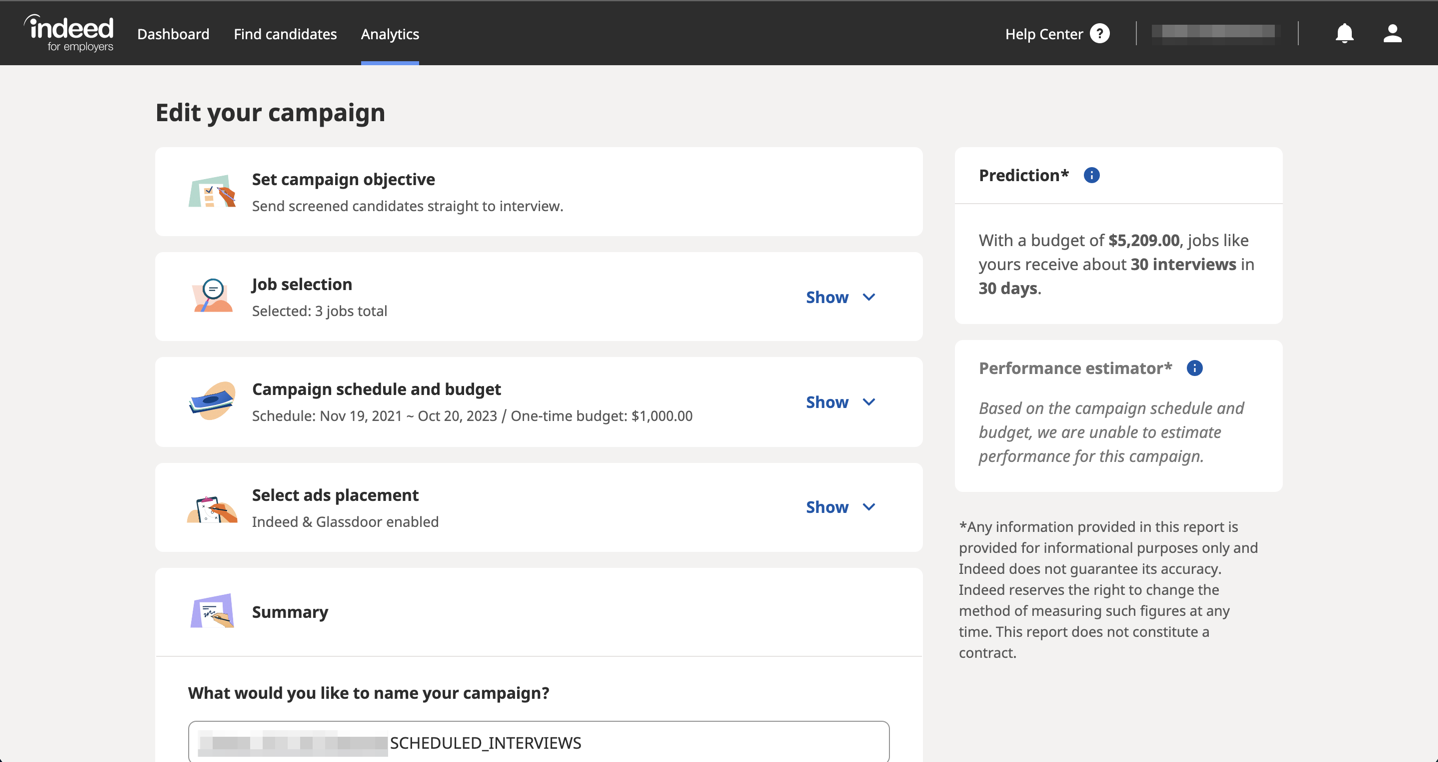
Interview campaign created on Indeed 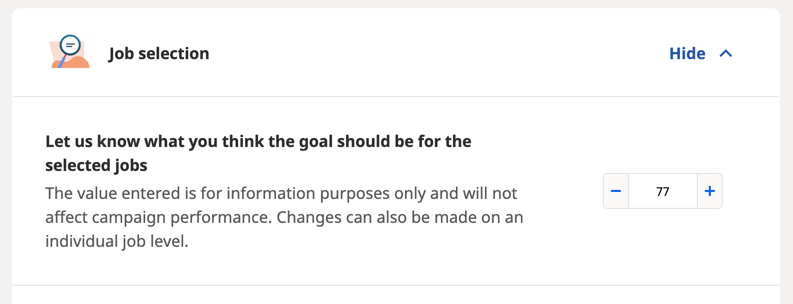
Interview target setting of interview campaign created on Indeed
Create a recurring campaign
Prerequisites
- Wait 2 to 3 hours after posting new jobs before creating a campaign.
- Your employer account must be associated with a job source before you create a campaign. Use
GET /v1/accountto list the job sources for your account. If none are associated, contact Indeed Customer Support. - Your employer account must have valid billing information before the campaign can sponsor jobs.
This example creates a recurring campaign that runs for six months and sponsors manager jobs in three locations with a monthly budget of $1500.
-
Use an access token with the required scopes.
Create recurring campaign scope employer_access employer.advertising.campaign -
Get the job source ID.
To find the job source ID, get employer account information. An employer can have more than one job source ID, one for each website or domain. Use
jobSourceList.idfor the site you want. -
Create the recurring campaign.
API details:
Create recurring campaign API URL https://apis.indeed.com/ads/v1/campaignsRequest type POSTContent type application/jsonAuth OAuth 2.0 bearer token Sample request:
{"name": "Test Campaign Recurring","status": "PAUSED","trackingToken": "MyTrackingToken","jobsSourceId": "[Your jobsSourceId from Step 2]","jobsToInclude": "QUERY","jobsQuery": "(city:Aberdeen OR city:Glasgow OR city:London) AND title: Manager","budgetMonthlyLimit": 1500,"startDate": "2021-09-01","fixedEndDate": "2022-04-01"}Sample response:
{"meta": {"status": 201,"errors": null,"rootLocation": "https://apis.indeed.com/ads","perPage": null,"links": [{"rel": "Campaign Info","href": "/v1/campaigns/52fxxxxxxxxx310"}]},"data": {"campaignId": "52fxxxxxxxxx310"}} -
View the recurring campaign in Indeed.
API call:
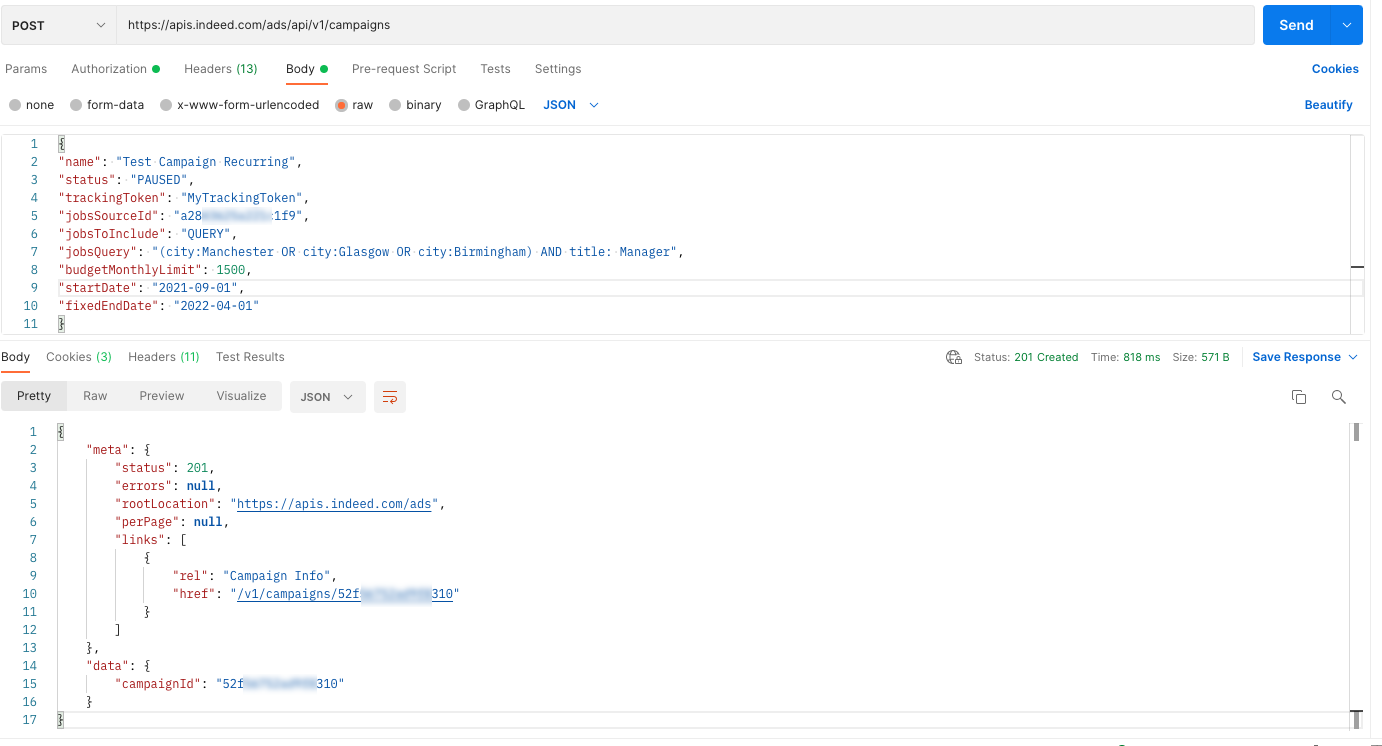
API call for a recurring campaign created on Indeed Campaign created in Indeed:
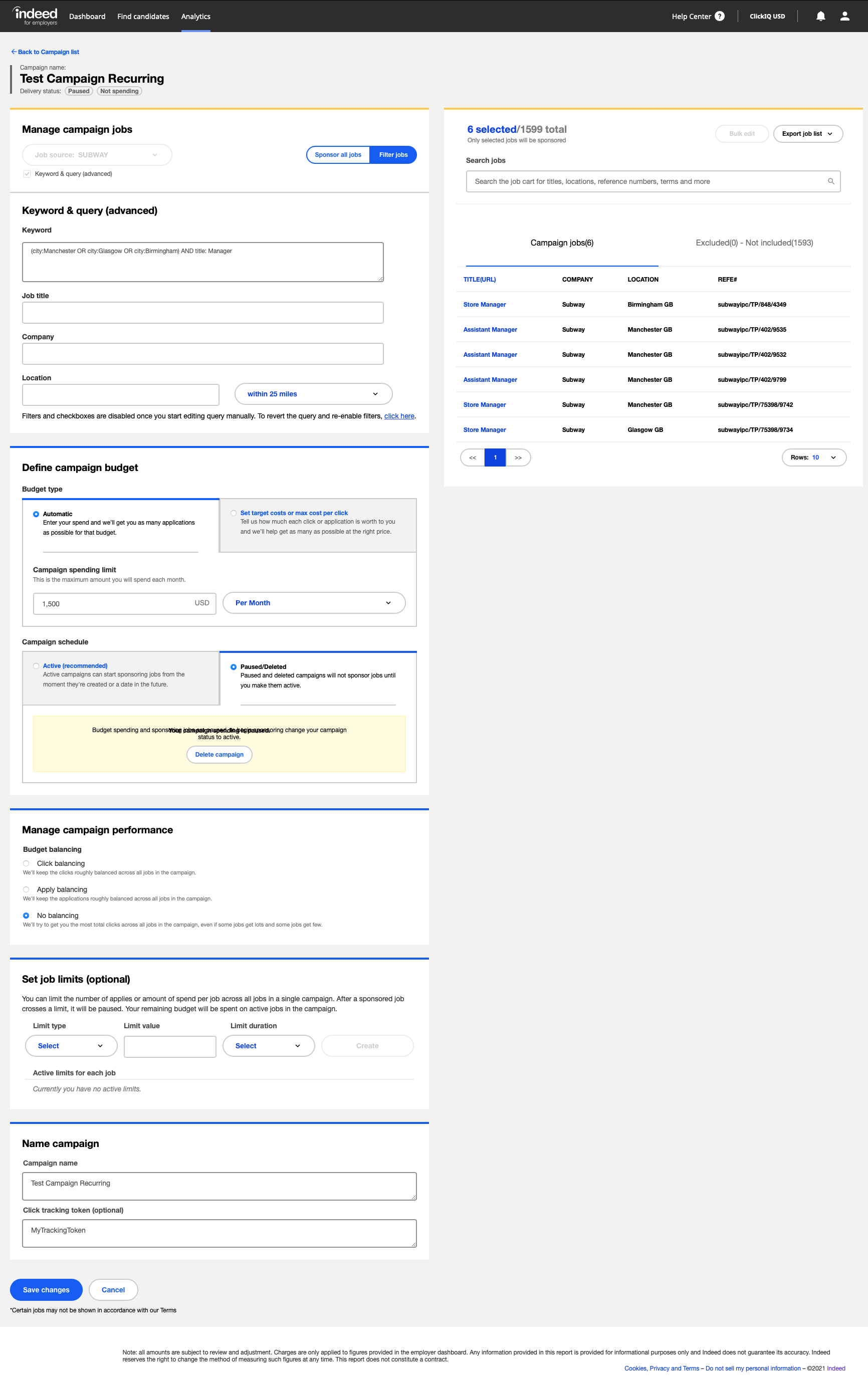
Recurring campaign created on Indeed
Update recurring campaign information
This example finds a campaign, updates it, and adds another location. You can also use this endpoint to start or pause campaigns, rename campaigns, and change the campaign tracking token. For more information, see the Sponsored Jobs API reference.
-
Use an access token with the required scopes.
Edit recurring campaign scope employer_access employer.advertising.campaign -
To get the recurring campaign ID, list employer campaigns and statuses.
API details:
Update recurring campaign API URL https://apis.indeed.com/ads/v1/campaignsRequest type GETContent type application/jsonAuth OAuth 2.0 bearer token Request parameters:
Update recurring campaign request parameters Key Value perPage10 statusPAUSED typeSOURCE Sample response:
"meta": {"status": 200,"errors": null,"rootLocation": "https://apis.indeed.com/ads","perPage": 10,"links": [{"rel": "'Test Campaign Single-use' Info","href": "/v1/campaigns/c8bxxxxxxxxx449"},{"rel": "'Test Campaign Recurring' Info","href": "/v1/campaigns/52fxxxxxxxxx310"}]},"data": {"Campaigns": [{"Name": "Test Campaign Single-use","Id": "c8bxxxxxxxxx449","Status": "PAUSED"},{"Name": "Test Campaign Recurring","Id": "52fxxxxxxxxx310","Status": "PAUSED"}]} -
Update the campaign query.
In
jobsQuery, pass a query in the indexed jobs query format.API details:
Update campaign query API URL https://apis.indeed.com/ads/v1/campaigns/:campaignId(use
campaignIdfrom step 2)Request type PATCHContent type application/jsonAuth OAuth 2.0 bearer token Sample request:
{"jobsToInclude": "QUERY","jobsQuery": "(city:Aberdeen OR city:Glasgow OR city:London OR city:Birmingham) AND title: Manager"}Sample response:
{"meta": {"status": 200,"errors": null,"rootLocation": "https://apis.indeed.com/ads","perPage": null,"links": [{"rel": "up","href": "/v1/campaigns"},{"rel": "Campaign Info","href": "/v1/campaigns/52fxxxxxxxxx310"},{"rel": "Traffic Statistics","href": "/v1/campaigns/52fxxxxxxxxx310/stats"}]},"data": {"campaignId": "52fxxxxxxxxx310"}} -
View the updated campaign in Indeed.
API call:
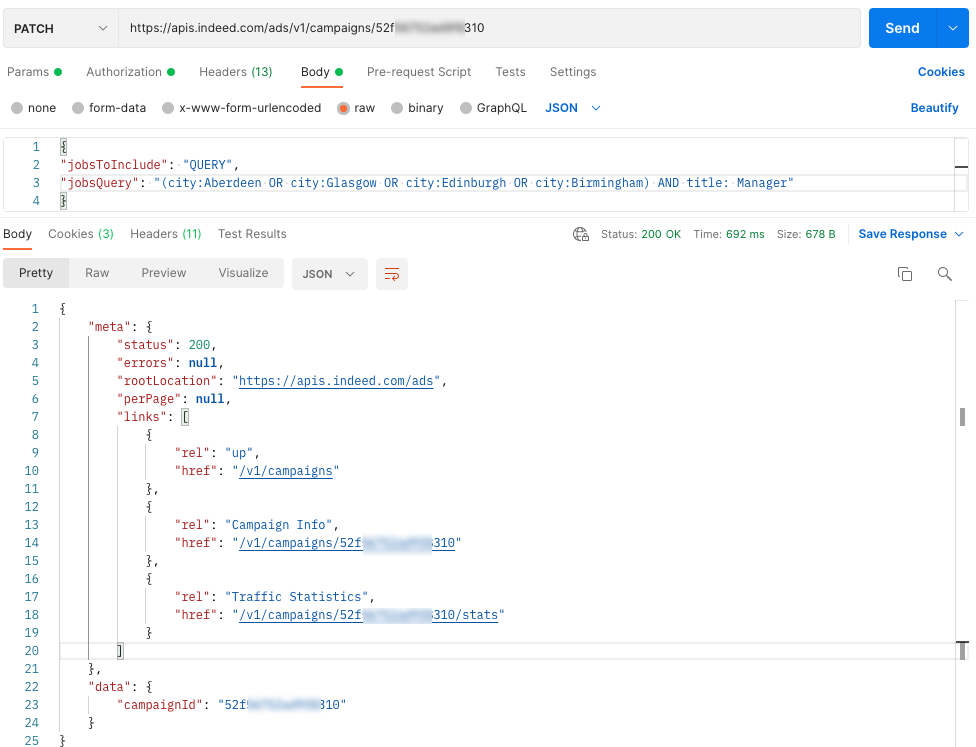
API call to edit a recurring campaign Updated campaign in Indeed:
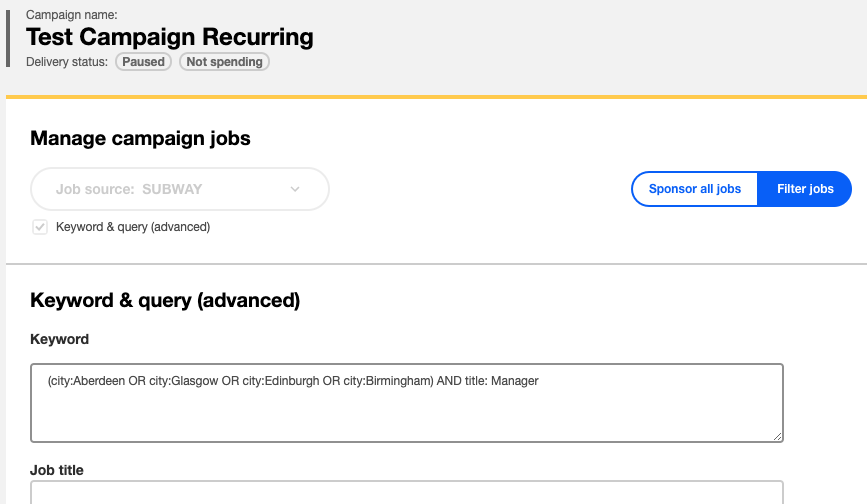
Recurring campaign updated on Indeed
Update campaign budget
This example finds a campaign and increases the monthly budget from $1500 to $1750.
-
Use an access token with the required scopes.
Change campaign budget scope employer_access employer.advertising.campaign -
Get the campaign ID.
To list campaigns, see get campaign ID for recurring campaign.
-
Update the campaign budget.
API details:
Update campaign budget API URL https://apis.indeed.com/ads/v1/campaigns/:campaignId/budget(use
campaignIdfrom step 2)Request type PATCHContent type application/jsonAuth OAuth 2.0 bearer token Sample request:
{"budgetMonthlyLimit": "1750"}Sample response:
{"meta": {"status": 200,"errors": null,"rootLocation": "https://apis.indeed.com/ads","perPage": null,"links": [{"rel": "up","href": "/v1/campaigns"},{"rel": "Campaign Info","href": "/v1/campaigns/52fxxxxxxxxx310"},{"rel": "Traffic Statistics","href": "/v1/campaigns/52fxxxxxxxxx310/stats"}]},"data": {"campaignId": "52fxxxxxxxxx310"}} -
View the updated budget in Indeed.
API call:
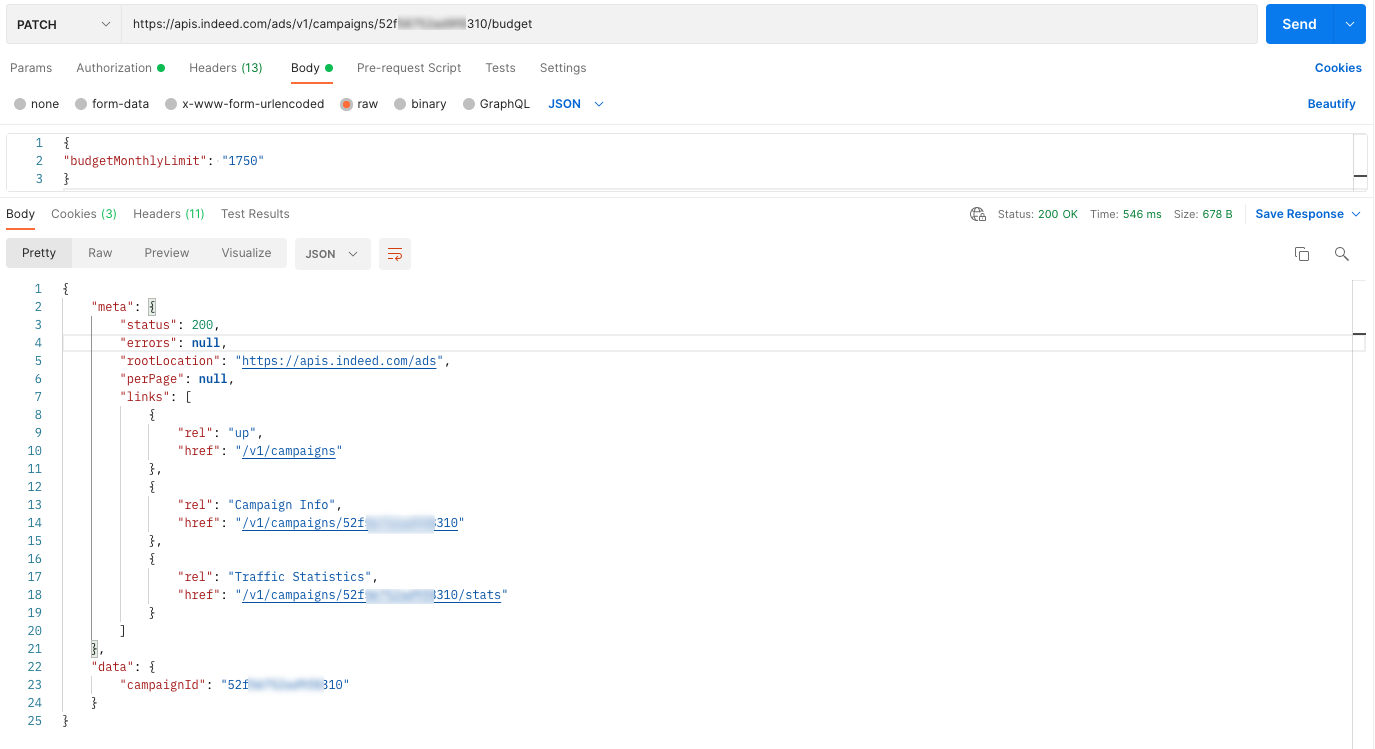
API call to update a campaign budget Updated budget in Indeed:
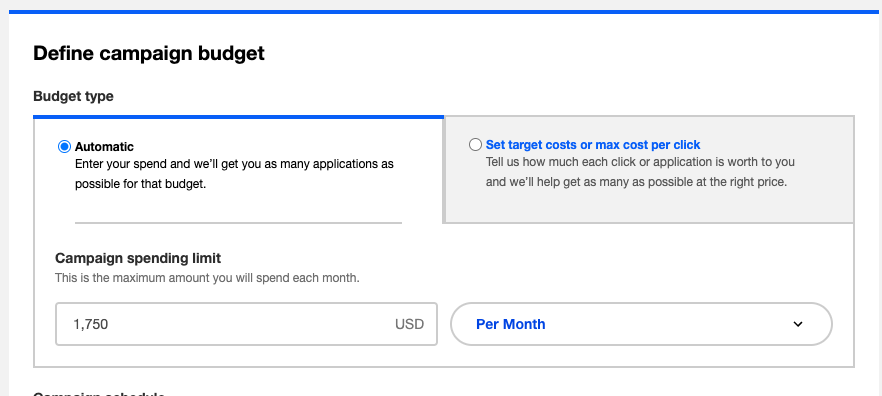
Updated campaign budget on Indeed
Update campaign duration
This example finds a one-time campaign and extends it by two weeks.
-
Use an access token with the required scopes.
Change campaign timeframe scope employer_access employer.advertising.campaign -
Get the campaign ID.
To list campaigns, see get campaign ID for recurring campaign.
-
Update the campaign dates.
API details:
Update campaign dates API URL https://apis.indeed.com/ads/v1/campaigns/:campaignId/budget(use
campaignIdfrom step 2)Request type PATCHContent type application/jsonAuth OAuth 2.0 bearer token Sample request:
{"fixedEndDate": "2021-09-30"}Sample response:
{"meta": {"status": 200,"errors": null,"rootLocation": "https://apis.indeed.com/ads","perPage": null,"links": [{"rel": "up","href": "/v1/campaigns"},{"rel": "Campaign Info","href": "/v1/campaigns/c8bxxxxxxxxx449"},{"rel": "Traffic Statistics","href": "/v1/campaigns/c8bxxxxxxxxx449/stats"}]},"data": {"campaignId": "c8bxxxxxxxxx449"}} -
View the updated timeframe in Indeed.
API call:
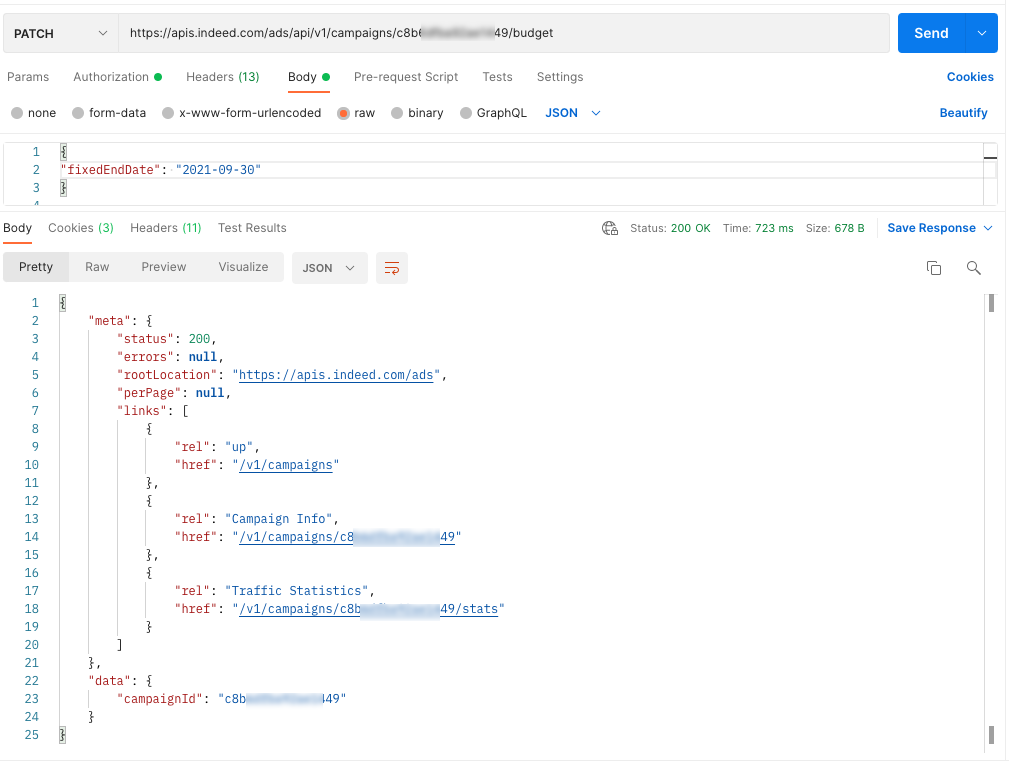
API call to update a campaign timeframe Updated campaign end date in Indeed:
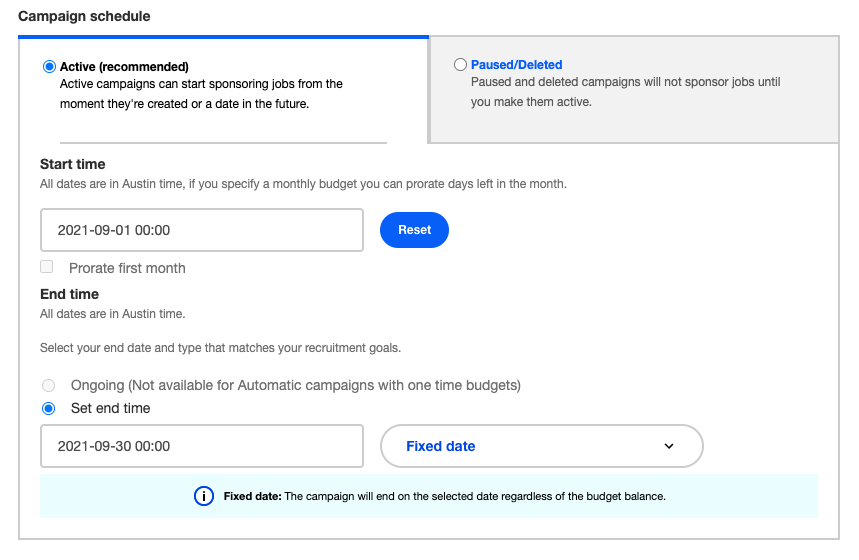
Updated end date on Indeed
Get details for jobs in campaign
This example gets detailed information about the jobs sponsored by a campaign.
-
Use an access token with the required scopes.
View jobs in campaign scope employer_access employer.advertising.campaign -
Get the campaign ID.
To list campaigns, see get campaign ID for recurring campaign.
-
Get the first page of sponsored jobs.
API details:
Get first page of jobs sponsored by campaign API URL https://apis.indeed.com/ads/v1/campaigns/:campaignId/jobDetails(use
campaignIdfrom step 2)Request type GETContent type application/jsonAuth OAuth 2.0 bearer token Sample request:
Request parameters:
Update campaign request parameters Key Value start0 perPage3 Sample response:
{"meta": {"status": 200,"errors": null,"rootLocation": "https://apis.qa.indeed.tech/ads","perPage": 3,"links": null},"data": {"entries": [{"jobKey": "839d4e5b2b8ca2a6","refNum": "267","title": "Experienced Driver","location": "London"},{"jobKey": "4191b62313a544aa","refNum": "259","title": "Branch Foreman","location": "London"},{"jobKey": "2977cb389f748f51","refNum": "305","title": "Trainee Manager","location": "London"}],"hash": 964409796}} -
Get the remaining pages.
Use the same request format for later pages. For each next page, add the previous
perPagevalue to the previousstartvalue and keepperPagethe same. For example, if the last page usedstart = 10andperPage = 5, request the next page withstart = 15andperPage = 5.To get all jobs sponsored by a campaign, keep requesting consecutive pages until one of these happens:
-
The
perPagevalue in the response differs from the requestedperPage. This usually means you reached the last page.perPagehas a maximum of500, so if the requestedperPageis greater than500, a different value in the response does not always mean you reached the last page. -
The
hashvalue in the response differs from the previous page. This means the job list changed while you were reading it. Pause for one minute, then restart fromstart = 0.
-
How-to guides for reports
Report on campaign performance
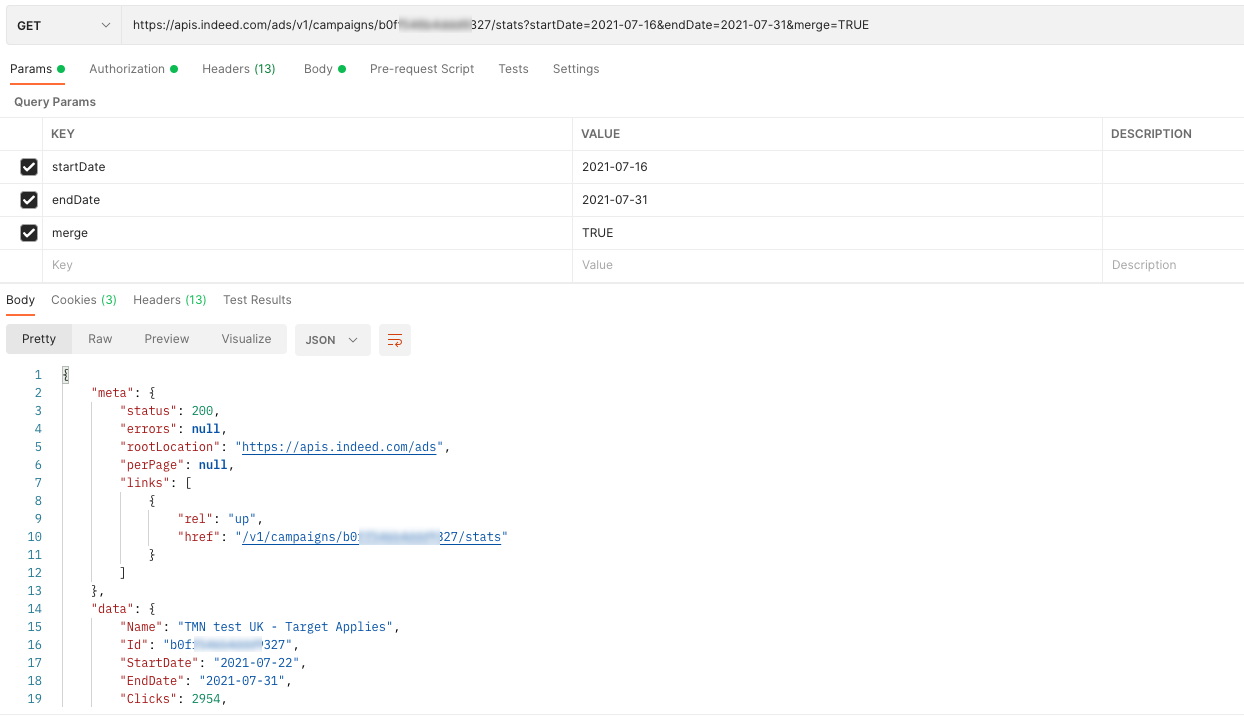
This example requests performance data for a campaign over a three-day period.
The example returns both an aggregated view and a per-day breakdown.
Use access token with scopes for campaign performance report
| scope | employer_access employer.advertising.campaign_report.read |
|---|
Get the campaign ID for campaign performance report
To list campaigns, see get campaign ID for recurring campaign.
Get campaign statistics
API details for campaign performance report
| API URL | https://apis.indeed.com/ads/v1/campaigns/{YourCampaignIdFromStep2}/stats |
|---|---|
| Request type | GET |
| Content type | application/json |
| Auth | OAuth 2.0 bearer token |
Request parameters for campaign performance report
| Key | Value |
|---|---|
startDate | 2021-07-16 |
endDate | 2021-07-31 |
merge |
Set this field to |
API response (Merge = TRUE)
{ "meta": { "status": 200, "errors": null, "rootLocation": "https://apis.indeed.com/ads", "perPage": null, "links": [{ "rel": "up", "href": "/v1/campaigns//b0fxxxxxxxxx327/stats" }] }, "data": { "Name": "TMN test UK - Target Applies", "Id": "/b0fxxxxxxxxx327", "StartDate": "2021-07-22", "EndDate": "2021-07-24", "Clicks": 989, "Impressions": 8384, "Conversions": 217, "CurrencyCode": "USD", "Cost": 598.69, "OrganicClicks": 35, "OrganicImpressions": 303, "Applystarts": 320, "OrganicApplystarts": 18 }}API response (Merge = FALSE)
{ "meta": { "status": 200, "errors": null, "rootLocation": "https://apis.indeed.com/ads", "perPage": 10, "links": [ { "rel": "up", "href": "/v1/campaigns//b0fxxxxxxxxx327/stats" } ] }, "data": { "entries": [ { "Name": "TMN test UK - Target Applies", "Id": "/b0fxxxxxxxxx327", "Date": "2021-07-22", "Clicks": 373, "Impressions": 3238, "Conversions": 83, "CurrencyCode": "USD", "Cost": 258.76, "OrganicClicks": 22, "OrganicImpressions": 226, "Applystarts": 125, "OrganicApplystarts": 9 }, { "Name": "TMN test UK - Target Applies", "Id": "/b0fxxxxxxxxx327", "Date": "2021-07-23", "Clicks": 318, "Impressions": 2665, "Conversions": 74, "CurrencyCode": "USD", "Cost": 178.28, "OrganicClicks": 7, "OrganicImpressions": 42, "Applystarts": 104, "OrganicApplystarts": 4 }, { "Name": "TMN test UK - Target Applies", "Id": "/b0fxxxxxxxxx327", "Date": "2021-07-24", "Clicks": 298, "Impressions": 2481, "Conversions": 60, "CurrencyCode": "USD", "Cost": 161.65, "OrganicClicks": 6, "OrganicImpressions": 35, "Applystarts": 91, "OrganicApplystarts": 5 } ] }}API call for campaign performance report
How-to guides for account management
Get employer account information
Get the employer's ID, contact information, and more.
-
Use access token with scopes for employer account.
Get employer account information scope employer_access employer.advertising.account.read -
Query the account endpoint.
API details for employer account:
API details for employer account API URL https://apis.indeed.com/ads/v1/accountRequest type GETContent type application/jsonAuth OAuth 2.0 bearer token Sample response for employer account:
{"meta": {"status": 200,"errors": null,"rootLocation": "https://apis.indeed.com/ads","perPage": null,"links": null},"data": {"employerId": "a2973d75fd4xxxxxxx748785257446e7","jobSourceList": [{"id": "a284xxxxxxx1c1f9","siteName": "MyCompany"}],"contact": "","company": "My Company Name","id": "4958xxxxxxx3732","email": "myEmailAddress@indeed.com"}}
Get subaccount information
Get a detailed list of subaccounts for a specific master account.
-
Use access token with scopes for subaccount information.
Do not include the
employerparameter when getting the access token for this operation.Get subaccount information scope employer.advertising.subaccount.read
-
Query the subaccounts endpoint.
API details to query subaccounts endpoint:
API details for query subaccounts API URL https://apis.indeed.com/ads/v1/subaccountsRequest type GETContent type application/jsonAuth OAuth 2.0 bearer token Sample response to query subaccounts endpoint:
{"meta": {"status": 200,"errors": null,"rootLocation": "https://apis.indeed.com/ads","perPage": 2,"links": {"rel": "next","href": "/V1/campaigns/3141xxxxxxxxx793"}},"data": {"SubAccountList": {"id": "3141xxxxxxxxx793","employerId": "4bc39xxxxxxxxx8efbc8486","company": "MyTestCompany","email": "example@mytestcompany.com"}}}
Create a subaccount
Add a subaccount to a master account.
-
Use access token with scopes to create subaccount.
Do not include the
employerparameter when retrieving the access token for this operation.Create subaccount scope employer.advertising.subaccount
-
Create the subaccounts endpoint.
API details to create subaccounts endpoint:
API details for create subaccounts API URL https://apis.indeed.com/ads/v1/subaccountsRequest type POSTContent type application/jsonAuth OAuth 2.0 bearer token Sample request to create subaccounts endpoint:
{"email": "testsubaccount@mytestcompany.com","currencyCode": "USD","language": "en","employeeCount": "1-49","company": "MyTestCompany2"}Sample response for subaccounts creation:
{"meta": {"status": 200,"errors": null,"rootLocation": "https://apis.indeed.com/ads","perPage": null,"links": null},"data": {"id": "31xxxxxxxxx794","employerId": "4bc39xxxxxxxxx8efbc8486","company": "MyTestCompany2","email": "testsubaccount@mytestcompany.com",}}
Get an account budget
Get the account's monthly budget.
Use access token with scopes for account budget:
Use access token with scopes for account budget scope employer_access employer.advertising.account.readGet the account budget endpoint. API details to get account budget:
Get account budget API URL Request type GETContent type application/jsonAuth OAuth 2.0 bearer token Sample response for get account budget:
If no budget is set, the
jobsMonthlyBudgetresponse field returnsnull.{"meta":{"status": 200,"errors": null,"rootLocation": "https://apis.indeed.com/ads","perPage": null,"links":[{"rel": "up","href": "/v1/account"}],"data":{"jobsMonthlyBudget": null}}}
Set an account budget
Update the account's monthly budget.
Use access token with scopes to set an account budget.
Use access token with scopes to set an account budget scope employer_access employer.advertising.accountQuery the account budget endpoint.
Set an account budget: API details:
Set an account budget API URL Request type PATCHContent type application/jsonAuth OAuth 2.0 bearer token Set an account budget: Sample request:
{ "jobsMonthlyBudget": 20000 }Set an account budget: Sample response:
{"meta": {"status": 200,"errors": null,"rootLocation": "https://apis.indeed.com/ads","perPage": null,"links": [{"rel": "up","href": "/v1/account"}],"data": ""}After you make this update and call Get an Account Budget, you receive the following response:
{"meta":{"status": 200,"errors": null,"rootLocation": "https://apis.indeed.com/ads","perPage": null,"links": ["rel": "up","href": "/v1/account"],"data":{"jobsMonthlyBudget": 20000.00}}}Jobs monthly budget setting in Indeed UI:
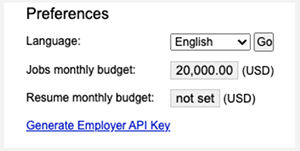
Monthly budget setting in Indeed UI
How-to guides for API quota usage
Get advertiser's API quota usage
Get the advertiser's Sponsored Jobs API usage, quota, and sponsored job spend for the given month.
You can retrieve this month and the previous 6 months. API usage counts exclude today. Spend is the total to date for the current month, and the full total for completed months.
- Use access token with scopes for API quota usage details.
| scope | employer_access employer.advertising.account.read |
|---|
- Call the API quota usage endpoint to get API quota usage:
| API URL | https://apis.indeed.com/ads/v1/apiquotausage |
|---|---|
| Request type | GET |
| Content type | application/json |
| Auth | OAuth 2.0 bearer token |
Request parameters for API quota usage:
| Key | Value |
|---|---|
monthYear | Month of quota usage to retrieve, in MMyyyy format. For example, 082026 for August 2026. Must be the current month or up to 6 months earlier. Optional. Default is the current month. |
Sample response for GET API quota usage:
{ "meta": { "status": 200, "errors": null, "rootLocation": "https://apis.indeed.com/ads", "perPage": null, "links": null }, "data": { "mmyyyy": "082026", "apiQuota": 1500, "sponsoredJobsSpendAmount": 3000, "currencyCode": "USD", "apiUsage": [ { "requestsCount": 1000 } ] } }Recommendations and guidelines
Prepare for eventual consistency
The API uses an eventual consistency model. For example, after you call POST /v1/campaigns to create a campaign, GET /v1/campaigns/{campaignId} might not return the new campaign for a brief period.
To handle eventual consistency, do not read a resource immediately after you create or update it. A successful response (200, 201, or another success code) confirms that Indeed persisted your changes — you do not need a follow-up GET to verify.
If you must read the resource right after a create or update, add a retry to wait for the change to become visible.
Ensure compatibility with API changes
Indeed can release backwards-compatible changes to the Sponsored Jobs API at any time without advance notice. Backwards-compatible changes include:
- Adding response fields.
- Reordering response fields.
- Updating error descriptions.
- Supporting new currencies and objective types.
Your app must follow these guidelines so backwards-compatible changes don't cause issues:
- Ignore unknown properties in JSON responses.
- Accept properties in any order in JSON responses.
- Use the
typeproperty to distinguish between errors, not thedescription.
Also, if your app works with employer accounts that your app does not solely manage, your app can encounter resources that another third-party app or Indeed for Employers created. Your app must handle these situations:
- Getting or updating campaigns that another app created might return the
INCOMPATIBLE_API_VERSIONerror. - Campaigns and subaccounts that another app created might use currency codes that your app does not support. Your app must handle any ISO 4217 currency code.
- Campaigns that another app created might use objective types that your app does not support. Your app must include fallback logic for unexpected objective types.
If you develop in Java, the popular Jackson library fails on unknown properties by default. To change this behavior, set @JsonIgnoreProperties(ignoreUnknown = true), which disables DeserializationFeature.FAIL_ON_UNKNOWN_PROPERTIES.
FAQs and troubleshooting
FAQs
Indeed does not provide a sandbox environment. You can read data from Indeed APIs in production with no cost or impact to your account. When testing create and update operations, create test campaigns in a paused state (status=paused) to prevent spending.
To clear an account budget, contact your client success representative.
Troubleshoot common errors
This topic describes errors that the Sponsored Jobs API returns. For errors that the authorization endpoints, such as https://apis.indeed.com/oauth/v2/tokens, return, see Troubleshoot authorization errors.
An unsuccessful HTTP status code, such as 400 through 599, indicates that the request failed. The response body contains further details. For example, calling Sponsored Jobs API without an access token results in the following response:
{ "meta": { "status": 401, "errors": [{ "type": "INVALID_TOKEN", "description": "Couldn't find access token in the request. The Authorization header is missing or incorrectly formatted." }], "rootLocation": "https://apis.indeed.com/ads", "perPage": null, "links": null }, "data": null}The errors array in the meta response field contains the error. Every error has a type and a human-readable description. This table describes the common error types.
Because the request path was not prefixed with /ads, the response indicates that the request could not be routed to the Sponsored Jobs API. For example, instead of https://apis.indeed.com/v1/account, use https://apis.indeed.com/ads/v1/account.
{ "fault": { "faultstring": "Unable to identify proxy for host: apis and url: /v1/account", "detail": { "errorcode": "messaging.adaptors.http.flow.ApplicationNotFound" } }}| HTTP status | Error type | Description and common causes |
|---|---|---|
400 | DATE_RANGE_TOO_LONG | Indicates that the Only |
400 | INCOMPATIBLE_API_VERSION | Your app gets or updates a resource that is incompatible with the Sponsored Jobs API version that your app invokes. This error occurs when an entity outside your app creates or modifies the resource. This error is reserved for potential future use and is not returned. |
400 | INVALID_ADVERTISEMENT_ID | The campaign ID included in the request was truncated, included unexpected characters or was otherwise malformed. |
400 | INVALID_REQUEST | A problem occurred with one of the request parameters:
The Unlike other error types, the |
400 | UNACCEPTED_PARAMETER | Specifying the subaccount to access using the Note that the employer IDs accepted by the |
400 | NOT_MASTER_ACCOUNT | This API endpoint can only be called with a master account. For now, this error is only returned from GET /v1/subaccounts and POST /v1/subaccounts. |
401 | INVALID_TOKEN | Request did not include a valid access token:
|
403 | EMPLOYER_ACCESS_TOKEN_NOT_ALLOWED | This API endpoint can't be accessed with an access token representing an employer. This might be because:
|
403 | INSUFFICIENT_SCOPE | The access token was valid but didn't have the scope required for this API endpoint. If you are using the client credentials grant type (2-legged OAuth):
If you are using the authorization code grant type (3-legged OAuth):
Note that
|
403 | LEGACY_ACCESS_TOKEN_NOT_ALLOWED | Sponsored Jobs API no longer supports access tokens that you get through legacy OAuth endpoints. For the updated endpoints, see Integrate with Indeed and call APIs. |
403 | NOT_EMPLOYER_ACCESS_TOKEN | The opposite of EMPLOYER_ACCESS_TOKEN_NOT_ALLOWED. This endpoint requires an access token that associates a user account with an employer account. You must specify the employer parameter when you request the access token. Most Sponsored Jobs API endpoints require this. |
404 | RESOURCE_NOT_FOUND | Indicates that there was a problem with the request URL:
|
500 | Any (usually INTERNAL_SERVER_ERROR) | Unexpected error. The problem is sometimes temporary. The same request can succeed after retrying. If retrying the request does not help, a problem with parsing the request might have occurred. Make sure that all the required parameters are present and that all parameters are correctly formatted. If you try to use an access token obtained with the client credentials grant type (2-legged OAuth) with the legacy Sponsored Jobs API endpoint, you also see |
Troubleshoot OAuth errors
See Troubleshoot OAuth errors.