Job Sync XML feed reference
Use an XML feed to define your jobs and how they appear on Indeed.
- By using this API and its documentation and building an integration, you agree to the Additional API Terms and Guidelines.
Indeed does not support HTML entities in XML feeds. Use literal characters instead, such as < instead of <. HTML entities can cause Indeed to reject the content or format it incorrectly.
Before you start, review Indeed + Your ATS.
The Indeed XML feed contains the job information that appears on Indeed. When you maintain an XML feed, you control how jobs appear on Indeed. You can also add the Indeed Apply label to jobs.
When your customers create jobs in your system, your XML feed sends those listings directly to Indeed.
The XML feed
Create and maintain an XML document that defines your jobs. Indeed monitors the file for changes in one of these ways:
- Crawling an XML URL
- Crawling a client-hosted FTP site (SFTP is also supported)
- Receiving the file directly on an Indeed FTP server (zipped files are recommended)
Include all jobs from your career page in the XML feed. Indeed does not accept incomplete XML feeds and does not support partial job opt-in. If your XML file does not include all jobs, Indeed might reject it or limit its visibility to job seekers.
Include in the XML all information that job seekers can see on your website. For example, if your job listings show salaries, include a data element such as <salary>. If salary information does not appear on your website, you do not need to include it for indexing.
Basic feed nodes
Basic feed nodes define general details for an XML feed, including the XML version and encoding, and ATS information (for ATS developers).
If Indeed requests modifications to your feed, make the corrections. Otherwise, Indeed might reject the feed loading request or stop loading feeds that are already active.
| Element | Description |
|---|---|
Required XML declaration. Example: | |
Required Root node for the XML feed document. | |
ATS developers only Name of the ATS that published this job. Example: | |
ATS developers only URL of the ATS that published this job. Example: | |
Required Job-specific metadata. Define one |
Job feed elements
Job feed elements define job-specific metadata for a node.
| Element | Description |
|---|---|
Required (except in Japan) Title of the job. Exclude salary, employment type, location, descriptions, and headlines. See also Misleading Content and Activities. Example: <![CDATA[Sales Executive]]> | |
Required Date when you first published the job. Use ISO-8601 format. If your site shows the publish date, the date must match the XML date. Example: <![CDATA[2014-12-19T22:49:39Z]]> | |
Required Unique ID for this job instance. Give jobs posted in multiple locations unique values. Do not change the value after you set it. Example: <![CDATA[unique123131]]> | |
Required Requisition ID for the job (formerly external job ID). Your system likely uses this value to track the original role and applicants. The value might appear on your public career page. Use the same value for each posting across feeds and locations. The value might not be unique. Example: <![CDATA[ab1212]]> | |
Job ID. Provide this element only when Indeed integrations such as Candidate Sync use this value to send candidate information to your system. Example: <![CDATA[ab1212]]> | |
Required URL for this job listing on your site. Use the job description page URL, not the application page. Include Example: | |
Required Parent organization hiring for the role. For subsidiaries or franchises with multiple locations, use the same Example: <![CDATA[[ABC Hospital]]> | |
ATS developers only Required Parent organization hiring for the role. For subsidiaries or franchises with multiple locations, use the same Example: <![CDATA[ABC Medical Group]]> | |
Required City where this job is located. Example: <![CDATA[Phoenix]]> | |
Required State where this job is located. Use postal abbreviations. Outside the US, use the matching province or region. Example: <![CDATA[AZ]]> | |
Required Country where this job is located. Example: <![CDATA[US]]> | |
Required if on the career site Postal code where this job is located. Example: <![CDATA[85003]]> | |
Required if on the career site Street address of the job's primary work location. Include the street name and number. Indeed uses the address for location-based search and display. Example:
| |
Required Email address tied to the Indeed account for this client. The Indeed Search Quality team uses this address to verify the business entity that posts the job. Example: | |
Required Job description that job seekers see on Indeed. Match the content and order on your Indeed might filter out buttons or link text that does not fit the Indeed context. Include HTML formatting. For supported elements, see Formatting guidelines. Example: | |
Required if on the career site Salary offered for this job. For best practices, see How to Display Pay Information in Job Postings. If a job has no salary, leave the field blank in the XML for that job. Indeed might also pull salary information directly from the job description, in addition to or instead of the value you set in If you do not enter the salary in the correct numerical format, Indeed might not display the salary or other pay data from this XML field. For the most predictable results, follow the salary best practices and provide the value in this XML field. Examples: <![CDATA[$50000 per year]]><![CDATA[$4000 - $5000 per month]]><![CDATA[年収500万円]]><![CDATA[月給40万円~50万円]]> | |
Required if on the career site Education level required for this job. Example: <![CDATA[Bachelors]] | |
Required if on the career site Type of job: full-time or part-time. Indeed might also pull this value directly from other job content that you provide. Example: <![CDATA[fulltime, parttime]] | |
Comma-delimited list of job categories that help job seekers refine their search. Indeed strongly recommends that you include this field to manage jobs, to help clients sponsor jobs by category, or to surface extra information from the job details page. For example, you can include facility or department information in this field. Example: <![CDATA[Category1, Category2, CategoryN]]> | |
Required if on the career site Experience required for this job. Example: <![CDATA[5+ years]]> | |
Required if on the career site Date when active hiring for the role ends. After this date, Indeed might remove the job from search results. Indeed interprets the date in the CST time zone by default. Example: <![CDATA[2021-11-08]]> | |
Note: This feature is not available in Japan. Unique URL for the job. Indeed uses this URL to track clicks on the job and sends a Example: | |
Type of remote work. Use one of these values:
For more about remote jobs, see these sections in the How to post a remote job on Indeed article (Japanese article):
Indeed does not use this element to determine the location. For text you can include in the job and for more about remote job postings, see XML feed FAQ. Example: <![CDATA[COVID-19]]> | |
Most recent timestamp of any action that your system took on this job. Actions can include candidate review, job update, and so on. Example: <![CDATA[2014-12-19T22:49:39Z]]> | |
Identifier that clients use internally to identify their own business units. Example: abc123 | |
Controls whether the job post appears in Indeed search. Provide one of these reason codes:
Example: <![CDATA[OPT_OUT]]> |
XML feed example
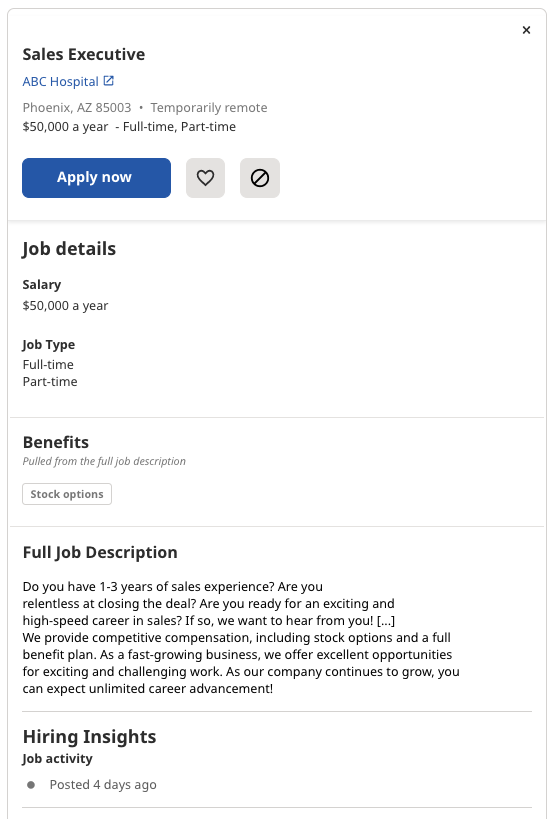
This example XML feed defines one job:
<?xml version="1.0" encoding="utf-8"?><source> <!--publisher is applicable to ATS developers only--> <publisher>ATS Name</publisher> <!--publisherurl is applicable to ATS developers only--> <publisherurl>http://www.atssite.com</publisherurl> <job> <title> <![CDATA[Sales Executive]]> </title> <date> <![CDATA[2021-06-29T22:49:39Z]]> </date> <referencenumber> <![CDATA[unique123131]]> </referencenumber> <requisitionid> <![CDATA[ab1212]]> </requisitionid> <url> <![CDATA[http://www.examplesite.com/viewjob.cfm?jobid=unique123131&source=Indeed]]> </url> <company> <![CDATA[ABC Hospital]]> </company> <sourcename> <![CDATA[ABC Medical Group]]> </sourcename> <city> <![CDATA[Phoenix]]> </city> <state> <![CDATA[AZ]]> </state> <country> <![CDATA[US]]> </country> <postalcode> <![CDATA[85003]]> </postalcode> <streetaddress> <![CDATA[123 fake street Phoenix AZ, 85003]]> </streetaddress> <email> <![CDATA[example@abccorp.com]]> </email> <description> <![CDATA[Do you have 1-3 years of sales experience? Are you relentless at closing the deal? Are you ready for an exciting and high-speed career in sales? If so, we want to hear from you! [...] We provide competitive compensation, including stock options and a full benefit plan. As a fast-growing business, we offer excellent opportunities for exciting and challenging work. As our company continues to grow, you can expect unlimited career advancement! ]]> </description> <salary> <![CDATA[$50000 per year]]> </salary> <education> <![CDATA[Bachelors]]> </education> <jobtype> <![CDATA[fulltime, parttime]]> </jobtype> <category> <![CDATA[Category1, Category2, CategoryN]]> </category> <experience> <![CDATA[5+ years]]> </experience> <expirationdate> <![CDATA[2021-11-08]]> </expirationdate> <remotetype> <![CDATA[Fully remote]]> </remotetype> <indeed-apply-data>COVERED IN A LATER SECTION</indeed-apply-data> </job></source>This XML feed renders this Indeed job listing:
Formatting guidelines
When you define job descriptions in the XML feed, wrap HTML formatting in CDATA tags. Use the same HTML formatting in CDATA tags that appears on your website.
Indeed normalizes and renders HTML in a standardized format for job seekers. It does not require strict HTML standards compliance.
| Tag | Description |
|---|---|
<b> | Bold text. |
| Header. Text in header tags appears in consistent sizes on Indeed. |
<br> | Single line break. |
<p> | Paragraph. Indeed automatically inserts an empty line between paragraph tags. |
<ul> | Unordered, or bulleted, list. |
<li> | List item. |
<strong> | Strong, or bold, text. |
<em> | Emphasized, or italicized, text. |
| Simple table. |
| Node | Description |
|---|---|
| Bold text. |
| Inline text. By default, |
The <p> tag has positive top and bottom margins and padding by default. Do not override this.
About new element settings
Japan only.You can configure these new elements in addition to existing elements (optional).
- You can specify keywords and image URLs as comma-separated multiple values.
- Indeed tests these new elements and rolls them out gradually, so Indeed does not guarantee that it displays every element you specify. Contact your assigned Alliance Manager for details.
- When you add or modify existing or new elements, request that Indeed add the corresponding configuration on its side. Notify Indeed whenever you make changes.
Other notes
Japan only.- Update the feed at least once per day.
- Make sure the XML feed content and the job detail page content match exactly.
- Do not include test jobs, job board jobs, or shopping mall jobs.
Formatting guidelines (Japan)
Japan only.To define job descriptions in the XML feed, include HTML formatting inside CDATA tags. Use the same HTML formatting in the CDATA tags that you use on your website.
Indeed normalizes HTML content and displays it to job seekers in a standardized format that does not strictly follow HTML standards.
Indeed does not support HTML entities. For example, use < instead of the HTML < entity.
Indeed can reject HTML that does not follow these formatting guidelines or render it with formatting issues.
Indeed supports these HTML tags:
| Tag | Description |
|---|---|
<b> | Bold. |
| Headers. Note: Indeed renders text in header tags at a consistent size on Indeed pages. |
<br> | Single line break. |
<p> | Paragraph. Indeed inserts blank lines between paragraph tags. |
<ul> | Unordered list (bulleted list). |
<li> | List item. |
<strong> | Bold text. |
<em> | Emphasized text (italic). |
| Basic table. Indeed renders each cell with a line break. |
Indeed also supports these computed style nodes:
| Node | Description |
|---|---|
<font style="font-weight:bold">Some bold text</font> | Bold. |
<div> <h2 style="display:inline">Label: </h2> Text </div> | Displays inline text.
|
Use positive numbers for margin and padding values above and below paragraph tags. This is the default behavior of <p> tags.
Formatting example
This example formats a job description:
English
<description> <![CDATA[<h2 id="job_description">Job Description:<ul><li>Do you have 1-3 years of sales experience?</li><li> Are you relentless at closing the deal? </li><li>Are you ready for an exciting and high-speed career in sales? If so, we want to hear from you!</li></ul><font style="font-weight:bold">Benefits</font><p>We provide competitive compensation, including stock options and a full benefit plan. As a fast-growing business, we offer excellent opportunities for exciting and challenging work. As our company continues to grow, you can expect unlimited career advancement! </p>]]></description>Japanese
<description> <![CDATA[<h2 id="job_description">仕事内容<ul><li>1~3年のセールスの経験をお持ちの方。</li><li> 取引成立に向けて全力で挑める方。 </li><li>セールス業界で、急成長を続ける活気に満ちた環境でのキャリアをお探しの方。連絡をお待ちしています。</li></ul><font style="font-weight:bold">福利厚生</font><p>ストックオプションや充実した福利厚生など、魅力的な給与体系が用意されています。急成長を続ける企業として、私たちは面白味があってやりがいを感じられる仕事の機会を提供しています。成長を続ける弊社内には、キャリアアップできるさまざまなチャンスがあります。</p>]]></description>Publish the XML feed
To publish and update your XML feed for Indeed, use one of these methods:
- Provide an XML URL for Indeed to crawl.
- Provide a client-hosted FTP or SFTP site for Indeed to access the feed.
- Publish the file directly to an Indeed FTP server. Indeed recommends compressed files.
Important XML feed policy guidelines
-
Include all jobs from your clients' career pages in the XML feed.
If the XML feed does not include all jobs, Indeed might reject the feed or limit job visibility.
-
Include all job information that job seekers can see on your clients' websites.
For example, if a career site lists salary information, your XML feed must also include the
<salary>element. If the career site does not list salary information, Indeed does not require it for indexing. -
Use URLs that link to job detail pages where job seekers can confirm job details without signing in.
The XML feed must include only current, actively hiring roles.
Common issues
Indeed can reject your XML feed or hide your jobs from search results because of these common issues:
Incomplete data
- If you omit required data from your XML feed, Indeed might not approve the feed for launch.
Incorrect special character encoding
- Open the feed URL in your browser, view the source, and confirm that special characters such as brackets (
<>) render correctly. Confirm that the feed uses an XML declaration with a character encoding such as UTF-8. The file must include a header that declares an encoding. You can use an encoding other than UTF-8, but UTF-8 is the most common. XML files must use the character ranges allowed by the XML standard.
Jobs are missing from the feed, or job counts differ between the feed and career sites
- Include every job in the feed for each client. The feed must include everything you publish on the web.
Jobs do not have unique reference numbers and locations
- Give every job a unique location, a unique reference number, and unique content. Otherwise, the job loses visibility on Indeed.
- If you reuse a reference number in the XML, Indeed shows only the first occurrence.
Region‑wide postings do not reflect region‑wide jobs
- Specify the location with at least three fields:
<city>,<state>, and<country>. - If you omit these elements, the job does not receive organic visibility by default.
Job postings for multiple locations
- To post the same job in multiple locations, send one entry for each location where the role is open.
- These unique job postings can use the same
<url>and<requisitionid>but require a unique<referencenumber>to avoid duplication.
Job postings in multiple languages
- To post the same job in multiple languages, create a unique job entry in the XML for each language.
- These unique job postings can use the same
<url>and<requisitionid>but require a unique<referencenumber>to avoid duplication.
Incomplete or empty job descriptions
- Include all text related to the job. For example, required qualifications might live in a separate category in your database, but include it in the
<description>field for Indeed.
Jobs that are scams or suspected scams
- Indeed works to exclude suspected scams. Write clear, complete job descriptions. Clients must be legitimate companies, and the listed jobs must be open positions.
Outdated jobs
- Do not include outdated or inactive jobs in the XML feed. When a job fills, remove it from the feed. If Indeed finds outdated or inactive jobs, Indeed can require you to correct the behavior to keep using your XML feed.
Job quality issues
- If clients do not follow the Job Posting Standards, if jobs are missing required fields, or if jobs do not meet Indeed quality rules, Indeed can exclude those jobs from search results.
- If clients have concerns about their postings, they can review Indeed Policies and contact the Employer Help Center.
These common errors can occur with XML job elements:
| Element | Common errors |
|---|---|
<title> | Includes extra text such as location, job type, shift, or catchphrases.
|
<date> | Specifies a future date. If this element specifies a future date, the job might not be visible. A future date. |
<company> | For subsidiaries or franchises that operate multiple stores under the same company, enter the business or brand name in the simplest form job seekers recognize immediately. Do not include phonetic readings. (Example 1) For companies with a facility or salon name, enter that name. For Hair Salon XX operated by Corporation A:
(Example 2) Do not add parentheses to the company name.
(Example 3) Japan only. Do not use abbreviations such as (株) or (有). Enter the official name only, without department names.
(Example 4) Japan only. Do not include phonetic readings.
|
| The English: For "1234 Sunny Lane, Phoenix, AZ 85003": Japanese: 「東京都千代田区丸の内1-9-2グラントウキョウサウスタワー」の場合:
|
<station> | Japan only. Use only the train station name. Put bus stop information in the For example, for "Nearest Roppongi Station XX bus stop":
Note: if the location information is incorrect, Indeed cannot load the job location correctly. |
<description> | The content and order of the The Indeed search results page shows the plain-text version of the Use HTML formatting. |
<salary> | The salary. Put the salary breakdown, examples, and bonuses in the Example: if the salary varies by experience: English:
Japanese:
Indeed can extract the salary from elements other than |
| All elements | If you rename an element (for example, |
XML feed FAQ
Your client credentials are an Indeed Apply API token and secret. Access these credentials in Partner Console.
Use the shared API secret, which has the Indeed Apply credential type.
Indeed computes a message signature with the HMAC-SHA1 algorithm and sends the signature in the X-Indeed-Signature HTTP header.
Indeed Apply sends a POST request to your postUrl with an HTTP header that you can use to verify the request's authenticity.
Today, EEO and demographic questions apply only to US-based jobs for EEO compliance.
Indeed supports qualification-type questions. These non-blocking questions let the applicant move to the next section in the apply flow even when the answer does not meet the qualification, and Indeed still delivers the application.
Use the Indeed Apply Questions tool to verify the syntax of your screener questions JSON file. The tool also shows how the screener questions appear in the Indeed Apply application flow.
Before you push a job or integration live, test your integration with the Indeed Apply XML configuration testing tool. On the Configurable Parameters tab, enter the relevant information to start testing the end-to-end apply flow.
For POST requests, an application is a duplicate when it has the same job ID and comes from the same job seeker email as an Indeed application within the last 120 days.
When you check for duplicates in your POST response, ignore applications that came from a source other than Indeed. Also, do not treat applications from the same job seeker email to a different job ID at the same company as duplicates.
For XML that Indeed crawls on a URL or hosts on an FTP server you provide, Indeed refreshes the job data four times a day at six-hour intervals, starting from the time of the last request. For Indeed-hosted FTPs, Indeed refreshes the XML feed when it receives a new file, as often as every two hours. More frequent file uploads can delay updates to the job data; if you see a delay in feed indexing, scale back the upload frequency.
As long as you include the standard fields, you can add any field, such as <branch_id>. If specific information must appear on Indeed, put it in the <description> field.
Indeed's visibility rules determine search results. The Search Quality team prioritizes jobs that are legitimate, unique, easy to apply for, and have detailed descriptions and locations.
If the data on the client site corresponds to a data target on Indeed, and the tags match the supported tags, the job appears on the search results page.
If a tag does not match an Indeed tag, visibility depends on factors such as the market, the device (desktop or mobile), and others.
If a tag contains information that must appear, ask the client to add the information inside the <description> tag.
Jobs that do not meet these criteria might not appear in search results. Confirm that your clients follow the Search Quality team's best practices for posting.
If clients have trouble finding their jobs on Indeed, contact Indeed for help.
Indeed requires a URL to the job description, not the apply page, for these reasons:
- If Indeed Apply fails, Indeed redirects the job seeker to the job URL.
- If a client opts out of Indeed Apply, job seekers still need a way to apply.
- The Indeed aggregation engine needs an active URL to confirm job content and activity.
For companies new to Indeed, or for new job sources from companies already on Indeed, Indeed requires a contact email address to verify the account and enable organic syndication.
Indeed does not always use the email address, but requires it for every job.
Provide the job in every language where an open position exists, as a unique job in the XML feed. If you reuse the reference number in the XML feed, Indeed shows only the first occurrence of the job.
Provide the job in every location where an open position exists. Indeed rejects region-wide postings that are not region-wide jobs from organic visibility. Each job must have a unique location, a unique reference number, and represent a unique job; otherwise, the job loses visibility on Indeed.
To post a state-wide job, send the state and country information by using those elements, and leave the <city> and <postalcode> elements blank.
Example: a statewide job in Texas:
<city> <![CDATA[]]></city><state> <![CDATA[TX]]></state><country> <![CDATA[US]]></country><postalcode> <![CDATA[]]></postalcode>Example: a statewide job in Tokyo:
<city> <![CDATA[]]></city><state> <![CDATA[東京都]]></state><country> <![CDATA[JP]]></country><postalcode> <![CDATA[]]></postalcode>To post a country-wide job, send the country using the <country> element, and send a blank value for <city>, <state>, and <postalcode>.
Example: a US nationwide job:
<city> <![CDATA[]]></city><state> <![CDATA[]]></state><country> <![CDATA[US]]></country><postalcode> <![CDATA[]]></postalcode>Example: a Japan nationwide job:
<city> <![CDATA[]]></city><state> <![CDATA[]]></state><country> <![CDATA[JP]]></country><postalcode> <![CDATA[]]></postalcode>Post jobs to the most specific and accurate location possible. All jobs must include all elements used in the feed, even if those elements are blank, as the examples show.
You can use the <city> or <state> elements to indicate that a job is fully remote by sending the value "remote". If you use this value, enter "remote" in both elements. Alternatively, enter "remote" in one element and leave the other blank. Do not enter "remote" in one element and a real location in the other element.
If you have a job that is fully remote but requires residency in a specific state, you can use the <remotetype> element in conjunction with the statewide posting schema.
Japan only. When posting remote jobs in Japan, leave <city> and <state> blank and use <remotetype>. If you have a fully remote job that requires residence in a specific prefecture, you can use the <remotetype> element in combination with the prefecture-wide posting schema.
Example: A fully-remote job in Texas:
<city> <![CDATA[]]></city><state> <![CDATA[TX]]></state><country> <![CDATA[US]]></country><postalcode> <![CDATA[]]></postalcode><remotetype> <![CDATA[Fully remote]]></remotetype>Example: A fully-remote job in Tokyo:
<city> <![CDATA[]]></city><state> <![CDATA[東京都]]></state><country> <![CDATA[JP]]></country><postalcode> <![CDATA[]]></postalcode><remotetype> <![CDATA[Fully remote]]></remotetype>Remote type values:
- Fully remote: The employee works remotely or from home.
- Hybrid remote: The employee works both in-office and remotely on a consistent basis.
Example: a fully remote job in the US:
<city> <![CDATA[Remote]]></city><state> <![CDATA[]]></state><country> <![CDATA[US]]></country><postalcode> <![CDATA[]]></postalcode><remotetype> <![CDATA[Fully remote]]></remotetype>Example: a fully remote job in Japan:
<city> <![CDATA[]]></city><state> <![CDATA[]]></state><country> <![CDATA[JP]]></country><postalcode> <![CDATA[]]></postalcode><remotetype> <![CDATA[Fully remote]]></remotetype>Example: a hybrid remote job in Austin, TX:
<city> <![CDATA[Austin]]></city><state> <![CDATA[TX]]></state><country> <![CDATA[US]]></country><postalcode> <![CDATA[78701]]></postalcode><remotetype> <![CDATA[Hybrid remote]]></remotetype>Example: a hybrid remote job in Minato, Tokyo:
<city> <![CDATA[港区三田]]></city><state> <![CDATA[東京都]]></state><country> <![CDATA[JP]]></country><postalcode> <![CDATA[100-8602]]></postalcode><remotetype> <![CDATA[Hybrid remote]]></remotetype>You cannot. Indeed Apply applies to every job on the client account. Clients can opt out of Indeed Apply at the account level, but not at the job level.
Steps and considerations:
- Opt in from your ATS: Opt in or opt out of Indeed Apply directly from your ATS platform. For help, contact your ATS.
- Troubleshooting: If Indeed Apply does not work as expected, confirm the client opted in. If issues persist, gather examples of jobs that do not show Easy Apply and contact Indeed support.
Use the <state> field for Japanese prefectures.
You can invite the job seeker to visit your site, but you cannot require additional questions to complete the application.
The X-Indeed-Signature header authenticates every POST request from Indeed and is always required. Indeed returns HTTP 401 when the signature does not match.