- Job Sync API workflow
- Job Sync API references
- Authentication
- Create job posting
- Request – Create job posting
- Response – Create job posting
- Create job posting with screener questions
- Request – Create job posting with screener questions
- Response – Create job posting with screener questions
- Get job posting status by ID
- Authentication for get job posting status by ID
- Request – Get job posting status by ID
- Response – Get job posting status by ID
- Job status
- List job postings by IDs
- Request – List job postings by IDs
- Response – List job postings by IDs
- Upsert job posting
- Request – Upsert job posting
- Response – Upsert job posting
- Expire job posting
- Request – Expire job posting
- Response – Expire job posting
- Rate limits
- Troubleshoot errors
Job Sync API guide
Create and manage job postings on Indeed.
By using this API and its documentation and building an integration, you agree to the Additional API Terms and Guidelines.
Job Sync API workflow
Use the Job Sync API to create and manage job postings on Indeed.
After you integrate the Job Sync API, you can:
- 1.Authenticate.
- 2.Create a job posting without screener questions.
- 3.Create a job posting with screener questions.
- 4.Get job posting status by ID.
- 5.List job postings by IDs.
- 6.Upsert a job posting. If the job exists, update it. If not, create it.
- 7.Expire a job posting.
- 8.Review rate limits.
- 9.Troubleshoot GraphQL errors.
- 10.Read the FAQs.
Job Sync API references
jobsIngest.createSourcedJobPostings- Creates, upserts, or reactivates job postings on Indeed.node- Gets job posting status by ID.nodes- Lists job postings by ID.jobsIngest.expireSourcedJobsBySourcedPostingId- Expires a job posting.
Authentication
When you become an Indeed partner, Indeed creates an app for your integration. Sign in to Partner Console to view the app and your OAuth credentials: client ID, secret, and a 3-legged OAuth authorization code. Exchange those credentials for an access token to authenticate API calls.
See Integrate with Indeed and call APIs.
Job Sync API calls are free. They do not count toward the costs or limits in the Sponsored Jobs API usage policy.
Create job posting
Creates a job posting on Indeed.
To create a job posting with screener questions, see Create job posting with screener questions.
Indeed can require different fields by country to meet local regulations and Indeed policies. For example, jobs created in the United States can behave differently from jobs created in Japan. Create jobs by country and follow that country’s regulations and Indeed policies. The API reference describes country-specific requirements.
Split jobs with multiple locations or languages into unique job postings:
- Post one job posting for each position-location pair.
- Post one job posting for each position-language pair.
These unique job postings can use the same url and jobRequisitionId but require a unique jobPostingId to avoid duplication.
For jobs in Japan, see Job posting guidelines and examples for Japan.
For rate limits for this call, see Rate limits.
Request – Create job posting
To create a job posting, call the jobsIngest.createSourcedJobPostings mutation.
In the jobPostings field, provide the job title, description, location, benefits, and job source details, including the source name.
Define these fields in CreateSourcedJobPostingInput:
body field
The required body field uses the SourcedJobPostingBodyInput type and contains the job description.
By default, Indeed treats job descriptions as plain text. To use richer formatting, provide the description in HTML.
Indeed normalizes supported HTML and renders it in a standard format for job seekers. HTML that does not follow these guidelines can be rejected or formatted incorrectly:
-
Use only supported HTML tags and computed style nodes.
-
Escape quotes in HTML:
<font style=\"font-weight:bold\">Some bold text</font> -
Use literal characters such as
<instead of<. HTML entities can cause rejection or incorrect formatting.
To use an HTML job description, set these fields in SourcedJobPostingBodyInput:
| Field | Type | Description |
|---|---|---|
description | String! | Required. The job description shown to job seekers. Maximum 65,000 bytes (1 byte for ASCII, 2 to 3 bytes for other characters). It must match |
descriptionFormatting | SourcedJobPostingFormattingType! | Description format. If the client uses HTML formatting on its job list or job details pages, Indeed policy generally requires HTML for XML and API jobs unless there is a reasonable explanation for not including it. Using HTML helps the job appear as closely as possible to the client version. Poor formatting can lead to complaints from clients and job seekers. To provide the job description in HTML, set this field to Default: |
For more information, see Job description formatting.
metadata field
The required metadata field uses the SourcedJobPostingMetadataInput! type and contains job posting metadata.
| Field | Type | Description |
|---|---|---|
jobPostingId | String | Required. The job ID in your ATS. These requirements apply:
|
sourceName | String | Required. The If an employer has multiple job groups that different people manage, assign a unique You cannot change a job’s |
contactEmail | EmailAddress! | Required. The contact email address in RFC 822 format. |
contactPhone | PhoneNumber | Required. The client contact phone number in E.164 format. If the phone number is not in E.164 format, the API returns a validation error. |
trackingUrl | WebUrl | This feature is not available in Japan. Optional. This URL tracks job views in external analytics when someone views a job. |
applyMethod field
The applyMethod field uses the SourcedJobPostingApplyMethodInput type and defines how job seekers apply.
This field is required when you create a job posting with Indeed Apply screener questions. Otherwise, it is optional. For screener question fields, see Screener questions fields.
-
jobRequisitionIdis optional in the schema, but Indeed requires it when it differs fromjobPostingId.For Japanese job postings: Set it to the same value as the ID or
jobPostingId. -
Hiring manager and recruiter values in
SourcedJobPostingJobContactInputare optional in the schema, but Indeed requires them when available.
See also:
jobRequisitionIdandjobPostingIdinSourcedJobPostingMetadataInputSourcedJobPostingJobContactInput
The API strips any leading or trailing spaces from the SourcedJobPostingJobSourceInput.sourceName and SourcedJobPostingMetadataInput.jobPostingId fields.
For other request fields, see createSourcedJobPostings.
Creates a job posting:
mutation { jobsIngest { createSourcedJobPostings(input: { jobPostings: [{ body: { title: "title 1" description: "description 1" location: { country: "US" cityRegionPostal: "Syracuse, New York 13209" } benefits: [] } metadata: { jobSource: { companyName: "Company" sourceName: "Source" sourceType: "Employer" } jobPostingId: "JobId1" datePublished: "2023-01-02T12:00Z" url: "http://example.com/careers/job1.html" contacts: [{ contactType: ["contact", "recruiter"] contactInfo: { contactEmail: "songdatadrop2@gmail.com" contactPhone: "+10001112223" contactName: "SL1" } }], trackingUrl: "https://www.example.com/" } }] }) { results { jobPosting { sourcedPostingId } } } }}mutation CreateJobPostingExample { jobsIngest { createSourcedJobPostings(input: { jobPostings: [{ body: { title: "Customer Support" description: "<h2 data-segment-type=\"header\" data-segment-label=\"WorkHours\">Working hours\n</h2><div data-segment-type=\"content\" data-segment-label=\"WorkHours\">8 working hours per day\n 5 working days per week</div>" descriptionFormatting: RICH_FORMATTING benefits: [] salary: { currency: "JPY" period: "HOUR" minimumMinor: 2000 fineGrainedSalaryInformation: { totalSalaryMinor: 2000 workingHours: 1 fixedOvertimePay: false } } hasProbationaryPeriod: NO location: { country: "JP" streetAddress: "108-0023 東京都港区芝浦3-1-21 田町ステーションタワーS18階" } } metadata: { jobSource: { companyName: "Sample Company" sourceName: "Sample Company" sourceType: "Employer" employerIds: [{ type: "YOUR EMPLOYER TYPE PROVIDED BY INDEED" id: "EmployerId1" }] } taxonomyClassification: { jobTypes: ["75GKK"] occupations: ["N3YNG"] attributes: ["7ADHN"] } jobPostingId: "YourJobId1" datePublished: "2023-01-01T12:34:56+09:00" url: "https://example.com/jobs/aaabbbccc" contacts: { contactType: "contact", contactInfo: { contactEmail: "contact@career.example.com" } }, trackingUrl: "https://www.example.com/" } applyMethod: { indeedApply: { postUrl: "https://example.com/applypost" apiToken: "API TOKEN HERE" } } }] }) { results { jobPosting { sourcedPostingId } } } }}Response – Create job posting
Successful response: Indeed generates a unique sourcedPostingId for each job posting.
{ "data": { "jobsIngest": { "createSourcedJobPostings": { "results": [ { "jobPosting": { "sourcedPostingId": "e29aaba8-2cef-447f-a1e0-bcb7ec3fa730", "employerJobId": "aXJpOi8vYXBpcy5pbmRlZWQuY29tL0VtcGxveWVySm9iL2UyOWFhYmE4LTJjZWYtNDQ3Zi1hMWUwLWJjYjdlYzNmYTczMA==" } } ] } } }}The sourcedPostingId value depends on whether the API accepts or rejects the posting:
-
If the API accepts a complete job posting,
sourcedPostingIdcontains the Indeed employer job ID. Use this value to expire or update the job. After spam and fraud checks, Indeed indexes the job and makes it available on Indeed within minutes to hours.If you create a job through either the
createSourcedJobPostingsmutation or an XML job feed, expiration of the job requires an action on your part. You must explicitly expire that job.Even if someone calls the
updateSourcedJobPostingsmutation or clicks Edit on the Indeed job details page for this job, you must explicitly expire that job.See also:
-
If the API rejects the job posting because of missing or malformed data,
sourcedPostingIdisnull, and the API returns an error in the standard GraphQLerrorsarray.
To troubleshoot validation errors, see Troubleshoot GraphQL errors. For more information about validation errors, see Validation in the GraphQL documentation.
Use sourcedPostingId to expire a job posting.
Create job posting with screener questions
After you integrate the Job Sync API, you can create a job posting with screener questions.
Screener questions help employers quickly determine whether applicants meet their criteria. When you add screener questions, employers can spend more time connecting with qualified candidates. Indeed does not host screener questions for you. If your system supports them, you must implement them for Indeed to approve your integration.
Request – Create job posting with screener questions
To create a job posting with Indeed Apply screener questions, call jobsIngest.createSourcedJobPostings. In the jobPostings field, provide the job title, description, location, benefits, and job source details, including the source name.
Indeed can require different fields by country to meet local regulations and Indeed policies. Create jobs by country and follow that country’s regulations and Indeed policies. The API reference describes country-specific requirements. For required fields, see the createSourcedJobPostings mutation fields.
To show screener questions in the Indeed Apply flow, you must also set the applyMethod field in CreateSourcedJobPostingInput.
Use one of these methods:
- Method 1
Format questions in JSON, then host the file at an HTTPS URL.
For each job, set that URL in
SourcedJobPostingIndeedApplyInput.applyQuestions.See Indeed Apply integration guide for ATS partners > Add Indeed Apply screener questions.
- Method 2
Define the screener question schema in
SourcedJobPostingIndeedApplyInput.applyQuestionsDetails.See Indeed Apply integration guide for ATS partners > Considerations.
The applyMethod field uses the SourcedJobPostingApplyMethodInput type and defines how job seekers apply. This field is required when you create a job posting with Indeed Apply screener questions. Otherwise, it is optional.
This table describes applyQuestions, applyQuestionsDetails, and related fields:
| Field | Type | Description |
|---|---|---|
applyQuestions | URI | Required when you create a job posting with screener questions by using method 1. A URL that returns a JSON-formatted string of questions for the Indeed Apply flow. |
applyQuestionsDetails | IndeedApplyQuestionsDetailsInput | Required when you create a job posting with screener questions by using method 2. The screener question schema for the Indeed Apply flow. |
questions | IndeedApplyScreenerQuestionsDefinitionInput | The screener questionnaire definition for the Indeed Apply flow, aligned with the V1.x standard. |
screenerQuestions | [ScreenerQuestionBodyInput!]! | General questions about the job, such as work experience, skills, or certifications. Do not include demographic questions about ethnicity, gender, or disability here. Put those in |
demographicQuestions | [DemographicQuestionsBodyInput!]! | Questions about a job applicant’s protected class, such as ethnicity, gender, or disability. Some jurisdictions regulate these questions. Indeed systems, and possibly your systems, must handle them differently. Demographic questions are limited to U.S.-based jobs for EEO compliance. Do not include general screener questions here. Put those in |
Method 1 example: Create Indeed Apply screener questions using applyQuestions:
mutation CreateSourcedJobPostings($companyName: String!$sourceName: String!$indeedApplyToken: ID!) { jobsIngest { createSourcedJobPostings(input: { jobPostings: [{ body: { title: "Software Engineer - All SQ and SQ types" description: "We are looking for a talented software engineer" descriptionFormatting: TEXT location: { latitude: 43.0729 longitude: -76.2161 country: "US" streetAddress: "123 Main St" cityRegionPostal: "Syracuse, New York 13209" } benefits: ["Health Insurance", "401k"] } metadata: { jobSource: { companyName: $companyName sourceName: $sourceName sourceType: "Employer" } jobPostingId: "JOB-12345" datePublished: "2023-01-01T12:00:00Z" url: "https://example.com/jobs/12345" contacts: [{ contactType: ["contact"] contactInfo: { contactEmail: "jobs@example.com" contactName: "HR Department" } }], visibility: { hideFromIndeedSearch: { reason: "OPT_OUT" } } trackingUrl: "https://www.example.com/" } applyMethod: { indeedApply: { postUrl: "https://example.com/apply" apiToken: $indeedApplyToken, resumeRequired: NO, applyQuestions: "https://your-webserver.com/job/questions/jb12345" } } }] }) { results { jobPosting { sourcedPostingId employerJobId } } } }}Method 2 example: Create Indeed Apply screener questions using applyQuestionsDetails:
mutation CreateSourcedJobPostings($companyName: String!$sourceName: String!$indeedApplyToken: ID!) { jobsIngest { createSourcedJobPostings(input: { jobPostings: [{ body: { title: "Software Engineer - All SQ and SQ types" description: "We are looking for a talented software engineer" descriptionFormatting: TEXT location: { latitude: 43.0729 longitude: -76.2161 country: "US" streetAddress: "123 Main St" cityRegionPostal: "Syracuse, New York 13209" } benefits: ["Health Insurance", "401k"] } metadata: { jobSource: { companyName: $companyName sourceName: $sourceName sourceType: "Employer" } jobPostingId: "JOB-12345" datePublished: "2023-01-01T12:00:00Z" url: "https://example.com/jobs/12345" contacts: [{ contactType: ["contact"] contactInfo: { contactEmail: "jobs@example.com" contactName: "HR Department" } }], visibility: { hideFromIndeedSearch: { reason: "OPT_OUT" } } trackingUrl: "https://www.example.com/" } applyMethod: { indeedApply: { postUrl: "https://example.com/apply" apiToken: $indeedApplyToken, resumeRequired: NO, applyQuestionsDetails: { questions: { screenerQuestions: [{ text: { integer: { questionInput: { id: "int1" question: "How many years of experience do you have?" minValue: 0 maxValue: 5 required: true, } } } } { text: { decimal: { questionInput: { id: "dec1" question: "What is your current hourly rate?" minValue: 10.0 maxValue: 120.0 required: false } qualification: { type: NON_BLOCKING range: { minValue: 15.0, maxValue: 100.0 } } } } } { text: { freeform: { id: "free1" question: "Briefly describe your relevant experience" maxCharCount: 500 required: true } } } { textarea: { id: "ta1" question: "Tell us about your most challenging project" maxCharCount: 2000 required: true } } { select: { questionInput: { id: "sel1" question: "What programming language are you most proficient in?" options: [{ value: "java", label: "Java" } { value: "python", label: "Python" } { value: "javascript", label: "JavaScript" } { value: "csharp", label: "C#" }] required: true } qualification: { type: NON_BLOCKING match: { values: ["java", "python"] } } } } { multiselect: { questionInput: { id: "multi1" question: "Which of the following technologies have you worked with?" options: [{ value: "react", label: "React" } { value: "angular", label: "Angular" } { value: "vue", label: "Vue" } { value: "svelte", label: "Svelte" }] required: true } qualification: { type: NON_BLOCKING match: { type: ANY, values: ["react", "angular"] } } } } { date: { questionInput: { id: "date1" question: "When can you start?" format: "MM-dd-yyyy" minDate: "2025-02-01T00:00:00Z" maxDate: "2025-12-31T00:00:00Z" required: true } qualification: { type: NON_BLOCKING range: { minValue: "2025-02-15T00:00:00Z" maxValue: "2025-12-31T00:00:00Z" } } } } { file: { id: "file1" question: "Please upload a sample of your work" format: ["pdf", "doc", "docx"] required: true, min: 1 } } { information: { id: "info1" text: "<p>Please note that all candidates must complete a coding assessment as part of the interview process.</p>" } } { pageBreak: { id: "page1" } } { hierarchical: { id: "hier1" question: "Select your location" options: [{ value: "us", label: "United States" } { value: "ca", label: "Canada" } { value: "uk", label: "United Kingdom" }] hierarchicalOptions: [{ id: "states" condition: { id: "hier1", values: ["us"] } options: [{ value: "ny", label: "New York" }, { value: "ca", label: "California" }] } { id: "provinces" condition: { id: "hier1", values: ["ca"] } options: [{ value: "on", label: "Ontario" }, { value: "bc", label: "British Columbia" }] }] required: true } }] demographicQuestions: [{ textarea: { id: "demo_ta1" question: "Please describe any accommodations you may need" maxCharCount: 1000 required: false } } { text: { freeform: { id: "demo_free1" question: "How did you hear about this position?" maxCharCount: 200 required: false } } } { text: { integer: { id: "demo_int1" question: "How many dependents do you have?" minValue: 0 maxValue: 20 required: false } } } { text: { decimal: { id: "demo_dec1" question: "What is your desired salary?" minValue: 30000.0 maxValue: 200000.0 required: false } } } { text: { numeric: { id: "demo_num1" question: "What is your zip code?" required: false } } } { select: { id: "demo_sel1" question: "What is your gender?" options: [{ value: "male", label: "Male" } { value: "female", label: "Female" } { value: "non-binary", label: "Non-binary" } { value: "prefer-not", label: "Prefer not to say" }] required: false } } { multiselect: { id: "demo_multi1" question: "Which of the following describe your ethnicity? (Select all that apply)" options: [{ value: "hispanic", label: "Hispanic or Latino" } { value: "white", label: "White" } { value: "black", label: "Black or African American" } { value: "asian", label: "Asian" } { value: "native" label: "Native American or Alaska Native" } { value: "pacific" label: "Native Hawaiian or Pacific Islander" } { value: "prefer-not", label: "Prefer not to say" }] required: false } } { date: { id: "demo_date1" question: "What is your date of birth?" format: "MM/dd/yyyy" required: false } } { information: { id: "demo_info1" text: "<p>The following questions are for Equal Employment Opportunity purposes only and do not affect your application status.</p>" } } { pageBreak: { id: "demo_page1" } }] } } } } }] }) { results { jobPosting { sourcedPostingId employerJobId } } } }}Response – Create job posting with screener questions
For an example response, see Response - Create job posting.
Get job posting status by ID
Get the status of a job posting by ID.
Authentication for get job posting status by ID
Use one of these token types:
| Token type | Description |
|---|---|
| 3-legged access token (ATS integrations) | If the user is signed out or the token is expired, show a Log in with Indeed button instead of job status. After sign-in, get a 3-legged token. Register an endpoint to receive the authorization code. |
| 2-legged access token with advertiser specified (direct employer/agency integrations) | Only direct employer and agency integrations can use this token type because the advertiser and integration owner are the same entity. Agencies already using 2-legged OAuth for Sponsored Jobs API already have this token type. |
Required scopes for 2-legged and 3-legged tokens:
employer_accessemployer.hosted_job
Recommended scope for 3-legged tokens:
offline_access(reduces repeated sign-ins for status checks)
Keep tokens secure, and never share them between users. If you use one user’s token for another user’s job, that user might gain access to the other user’s job.
For scope details, see Scopes.
Each 3-legged token is tied to the user who authorized it. If that user is not linked to the requested advertiser or employer account, the request returns FORBIDDEN.
After you get a token, include it in the query.
Refresh rules:
- 2-legged tokens cannot be refreshed. Request a new token.
- 3-legged tokens can be refreshed only if
offline_accesswas requested during initial authorization. - For 3-legged tokens with
offline_access, refresh before expiration to avoid repeated sign-ins.
Request – Get job posting status by ID
To get the status of a job posting by ID, call the node query with an OAuth token.
node takes id, which is the employer job ID in Base64-encoded IRI format. Use the employerJobId returned by createSourcedJobPostings.
query { node(id: "aXJpOi8vYXBpcy5pbmRlZWQuY29tL0VtcGxveWVySm9iLzkxZGU0ZjVhLWE1MWYtNGQ1Ni1iOWI0LWNhMDQzZWVjNDAzMQ==" ) { ...on EmployerJob { id jobData { title datePostedOnIndeed dateCreated description company jobLocation { countryCode city postalCode fullAddress } externalJobPageUrl externalPostingMetadata { jobPostingId jobRequisitionId campaignCategories trackingUrls isIntegratedJob } } managementUrls { viewJob } seatsConnection { pageInfo { endCursor hasNextPage hasPreviousPage startCursor } seats { jobPost { id externalPartnerCallToAction(input: { locale: "en-us" }) { imageAltText imageUrl } status { globalStatus { lifecycleStatus isIndeedApplyActive } surfaceStatuses { isRejected isSponsorshipRequired isMissingRequiredSponsorship } } } } } } }}Response – Get job posting status by ID
node returns the EmployerJob object, which implements the Node interface, for the specified employer job ID.
This query returns one result, so the cursors are identical and there are no next or previous pages.
{ "data": { "node": { "id": "aXJpOi8vYXBpcy5pbmRlZWQuY29tL0VtcGxveWVySm9iLzkxZGU0ZjVhLWE1MWYtNGQ1Ni1iOWI0LWNhMDQzZWVjNDAzMQ==", "jobData": { "title": "Certified Nursing Assistant CNA", "datePostedOnIndeed": "2022-03-22T20:33:28Z", "dateCreated": "2022-03-22T20:33:28Z", "description": "Anytown Health and Rehabilitation Center in Anytown, USA is a 186-bed center offering a variety of individualized, health care services for our patients and residents. We are seeking a qualified and committed team member to join our team.", "company": "Anytown Health and Rehabilitation Center", "jobLocation": { "countryCode": "US", "city": "Cambridge", "postalCode": null, "fullAddress": null }, "externalJobPageUrl": "http://www.indeed.com/job/certified-nursing-assistant-cna-9354ed892ad3a1b6", "externalPostingMetadata": { "jobPostingId": "CBA-Anytown-Posting-Id", "jobRequisitionId": "CBA-Anytown-Req-Id", "campaignCategories": [], "trackingUrls": [], "isIntegratedJob": false } }, "managementUrls": { "viewJob": "https://employers.indeed.com/jobs/view?employerJobId=aXJpOi8vYXBpcy5pbmRlZWQuY29tL0VtcGxveWVySm9iLzkxZGU0ZjVhLWE1MWYtNGQ1Ni1iOWI0LWNhMDQzZWVjNDAzMQ==" }, "seatsConnection": { "pageInfo": { "endCursor": "YVhKcE9pOHZZWEJwY3k1cGJtUmxaV1F1WTI5dEwwcHZZbEJ2YzNRdk5EQXhOVFkxTW1OaFpEYzJZVFF4TlE9PQ==", "hasNextPage": false, "hasPreviousPage": false, "startCursor": "YVhKcE9pOHZZWEJwY3k1cGJtUmxaV1F1WTI5dEwwcHZZbEJ2YzNRdk5EQXhOVFkxTW1OaFpEYzJZVFF4TlE9PQ==" }, "seats": [ { "jobPost": { "id": "aXJpOi8vYXBpcy5pbmRlZWQuY29tL0pvYlBvc3QvNDAxNTY1MmNhZDc2YTQxNQ==", "externalPartnerCallToAction": [ { "imageUrl": "https://dlogqfjusi9uq.cloudfront.net/cta/en_US/not_searchable.svg", "imageAltText": "Update needed on Indeed" } ], "status": { "globalStatus": [ { "lifecycleStatus": "INACTIVE", "isIndeedApplyActive": false } ], "surfaceStatuses": [ { "isRejected": false, "isSponsorshipRequired": false, "isMissingRequiredSponsorship": false } ] } } } ] } } }}EmployerJob contains these fields:
| Field | Description |
|---|---|
idType: ID! | Employer Job ID (EJID), which is an encoded version of sourcedPostingId in Indeed Resource Identifier (IRI) format. Use this value to expire a job posting, update a job posting, or upsert a job posting. |
jobDataType: EmployerJobData | Contains job posting data.
|
managementUrls.viewJobType: WebUrl! | URL for the employer’s job detail page on Indeed. On this page, users can review job posting details, including moderation information, and see how the job appears to candidates. |
seatsConnectionType: EmployerJobSeatsConnection | Paginated list of job seats. A job seat contains location, schedule, and compensation details. A job can have zero or more seats, and each seat maps to a job posting. |
globalStatus.lifecycleStatusType: JobPostLifecycleStatus |
|
globalStatus.isIndeedApplyActiveType: Boolean! | Shows whether Indeed Apply is enabled for the job. |
Job status
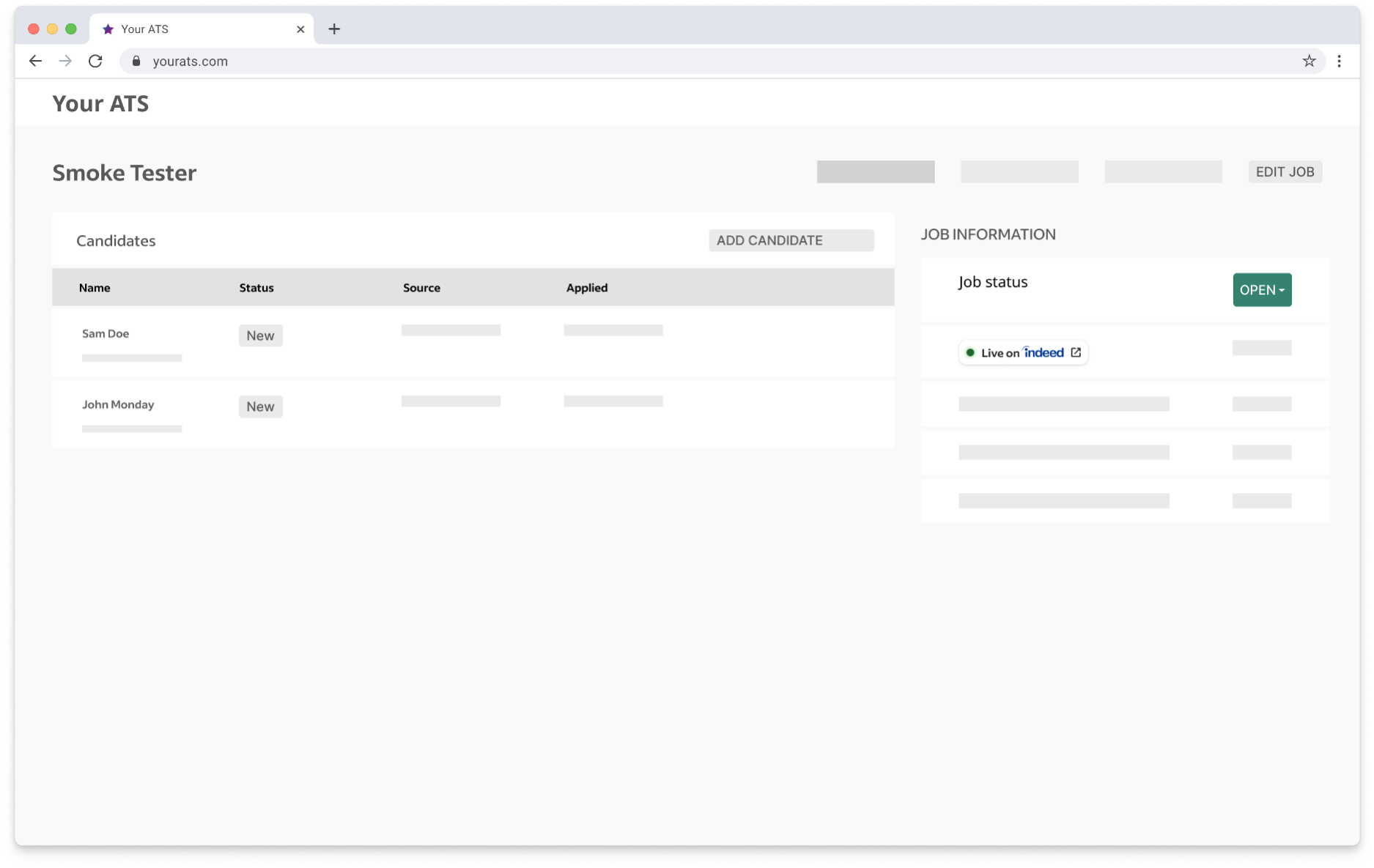
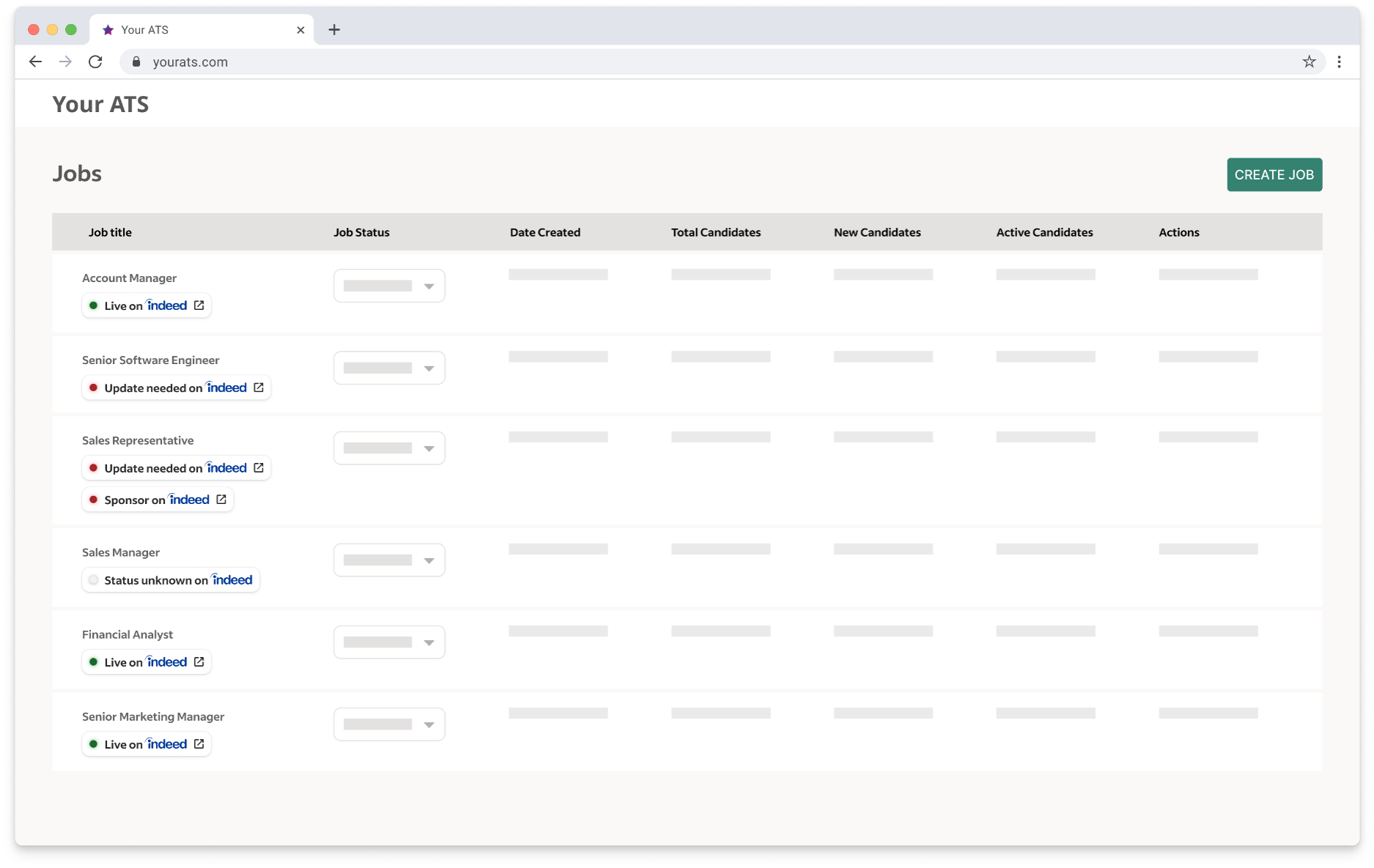
Show the Indeed job status as a link to Indeed’s job management page. When users click the image, they can view more details on Indeed.
-
Call the
externalPartnerCallToActionsubquery underseats.jobPostto get the call-to-action image. Specify a supported locale.localeuses fallback logic. If you requestfr_CHand that locale is not supported, it falls back tofr.If no matching locale exists, the default is
en_US.The query returns an
imageUrlfor one of these job status images:Job status Image Description 
The job is live on Indeed.
The job appears in search results.

The job is expired on Indeed.
The job does not appear in search results.

The job needs sponsorship on Indeed.
The job does not appear in search results.

The job status is unknown on Indeed.
Either the job is not found on Indeed, or the user account does not have access to the job.
Note:
The API does not return the
not_found.svgimage. Call-to-action images are part of the job data, so the API cannot return this image if the job is not found. However, the ATS can use this image if needed.
The job needs an update on Indeed before it can appear in search results.
-
Query
managementUrls.viewJobto get the URL for the user’s job detail page. -
Embed the call-to-action image as a clickable link on the job detail page.
-
Update the job posting status when the user opens the page.
See Frequently asked questions > Job visibility.
Example ATS job status displays:
Job details page (signed in to Indeed)
Job list page (signed in to Indeed)
List job postings by IDs
View details for multiple job postings. For authentication, see Authentication for get job posting status by ID.
Request – List job postings by IDs
nodes accepts multiple IDs. It takes ids, which is an array of employer job IDs in IRI format.
query { nodes(ids: [ "aXJpOi8vYXBpcy5pbmRlZWQuY29tL0VtcGxveWVySm9iLzkxZGU0ZjVhLWE1MWYtNGQ1Ni1iOWI0LWNhMDQzZWVjNDAzMQ==" ]) { ...on EmployerJob { id jobData { title datePostedOnIndeed dateCreated description company jobLocation { countryCode city postalCode fullAddress } externalJobPageUrl externalPostingMetadata { jobPostingId jobRequisitionId campaignCategories trackingUrls isIntegratedJob } } managementUrls { viewJob } seatsConnection { pageInfo { endCursor hasNextPage hasPreviousPage startCursor } seats { jobPost { id externalPartnerCallToAction(input: { locale: "en-us" }) { imageAltText imageUrl } status { globalStatus { lifecycleStatus isIndeedApplyActive } surfaceStatuses { isRejected isSponsorshipRequired isMissingRequiredSponsorship } } } } } } }}Response – List job postings by IDs
Returns an EmployerJob array. See the Response – Get job posting status by ID table.
{ "data": { "nodes": [{ "id": "aXJpOi8vYXBpcy5pbmRlZWQuY29tL0VtcGxveWVySm9iLzkxZGU0ZjVhLWE1MWYtNGQ1Ni1iOWI0LWNhMDQzZWVjNDAzMQ==", "jobData": { "title": "Certified Nursing Assistant CNA", "datePostedOnIndeed": "2022-03-22T20:33:28Z", "dateCreated": "2022-03-22T20:33:28Z", "description": "Anytown Health and Rehabilitation Center in Anytown, USA is a 186-bed center offering a variety of individualized, health care services for our patients and residents. We are seeking a qualified and committed team member to join our team.", "company": "Anytown Health and Rehabilitation Center", "jobLocation": { "countryCode": "US", "city": "Cambridge", "postalCode": null, "fullAddress": null }, "externalJobPageUrl": "http://www.indeed.com/job/certified-nursing-assistant-cna-9354ed892ad3a1b6", "externalPostingMetadata": { "jobPostingId": "CBA-Anytown-Posting-Id", "jobRequisitionId": "CBA-Anytown-Req-Id", "campaignCategories": [], "trackingUrls": [], "isIntegratedJob": false } }, "managementUrls": { "viewJob": "https://employers.indeed.com/jobs/view?employerJobId=aXJpOi8vYXBpcy5pbmRlZWQuY29tL0VtcGxveWVySm9iLzkxZGU0ZjVhLWE1MWYtNGQ1Ni1iOWI0LWNhMDQzZWVjNDAzMQ==" }, "seatsConnection": { "pageInfo": { "endCursor": "YVhKcE9pOHZZWEJwY3k1cGJtUmxaV1F1WTI5dEwwcHZZbEJ2YzNRdk5EQXhOVFkxTW1OaFpEYzJZVFF4TlE9PQ==", "hasNextPage": false, "hasPreviousPage": false, "startCursor": "YVhKcE9pOHZZWEJwY3k1cGJtUmxaV1F1WTI5dEwwcHZZbEJ2YzNRdk5EQXhOVFkxTW1OaFpEYzJZVFF4TlE9PQ==" }, "seats": [{ "jobPost": { "id": "aXJpOi8vYXBpcy5pbmRlZWQuY29tL0pvYlBvc3QvNDAxNTY1MmNhZDc2YTQxNQ==", "externalPartnerCallToAction": [{ "imageUrl": "https://dlogqfjusi9uq.cloudfront.net/cta/en_US/not_searchable.svg", "imageAltText": "Update needed on Indeed" }], "status": { "globalStatus": [{ "lifecycleStatus": "INACTIVE", "isIndeedApplyActive": false }], "surfaceStatuses": [{ "isRejected": false, "isSponsorshipRequired": false, "isMissingRequiredSponsorship": false }] } } }] } }, { "id": "aXJpOi8vYXBpcy5pbmRlZWQuY29tL0VtcGxveWVySm9iLzkxZGU0ZjVhLWE1MWYtNGQ1Ni1iOWI0LWNhMDQzZWVjNDAzMZ==", ... }] }}If users access your ATS to view Indeed job information, you can show the Indeed job status with a link to Indeed’s job management page. For more information, see Job status.
Upsert job posting
- If you submitted the job posting to Indeed, upsert it.
- If another partner submitted it, update the posting. Updates are primarily for ad agencies.
Japan only: All partners except ad agencies and Indeed PLUS Publisher Network partners can update the posting.
See also:
Upserts a job posting on Indeed and the Indeed PLUS publishing network.
An upsert updates a job posting if it exists. If it does not exist, it creates it.
Provide all required job fields, even if those values are not changing.
For rate limits for this call, see Rate limits.
Request – Upsert job posting
To upsert a job posting, call jobsIngest.createSourcedJobPostings, just as you do to create a job posting.
Upsert job posting example
This example upserts a U.S.-based job posting for a single-feed client. It uses the same example as Create job posting, but updates the title and description fields.
Use the same values for jobPostingId, sourceName, and the OAuth client ID that you used when you created the job posting.
Provide all required fields, even if you are not changing them. The API returns the same unique sourcedPostingId that Indeed generated when you created the job posting.
mutation { jobsIngest { createSourcedJobPostings(input: { jobPostings: [{ body: { title: "Updated job title" description: "Updated job description" location: { country: "US" cityRegionPostal: "Syracuse, New York 13209" } benefits: [] } metadata: { jobSource: { companyName: "Company" sourceName: "Source" sourceType: "Employer" } jobPostingId: "JobId1" datePublished: "2023-01-02T12:00Z" url: "http://example.com/careers/job1.html" contacts: [{ contactType: ["contact", "recruiter"] contactInfo: { contactEmail: "songdatadrop2@gmail.com" contactPhone: "+10001112223" contactName: "SL1" } }] } }] }) { results { jobPosting { sourcedPostingId } } } }}Response – Upsert job posting
The mutation returns the same sourcedPostingId that Indeed generated when it created the job posting. This value is the Indeed employer job ID, which you use to expire or update the job.
Expire job posting
Removes a job posting from Indeed and the Indeed PLUS publishing network.
The Job Sync API doesn't auto-expire postings, so you must call it explicitly to expire any job you remove from your career page.
Indeed does not automatically expire jobs that you submit through the Job Sync API.
The ATS controls job posting creation and expiration. When you remove a job posting from your career page, you must explicitly call the Job Sync API to expire it.
If you create a job through either the createSourcedJobPostings mutation or an XML job feed, expiration of the job requires an action on your part. You must explicitly expire that job.
Even if someone calls the updateSourcedJobPostings mutation or clicks Edit on the Indeed job details page for this job, you must explicitly expire that job.
See also:
createSourcedJobPostingsupdateSourcedJobPostings- Job details page (signed in to Indeed)
- Job Sync XML feed reference
To reactivate an expired job, call jobsIngest.createSourcedJobPostings with the jobPostingId and sourceName values from the expired job, just as you would when updating an active job.
To define the date when the ATS reactivated the job, update the datePublished field value.
You can reactivate a job for 30 days after it expires.
After 30 days, Indeed can archive the job’s statistics and configuration. If you reactivate the job after 30 days, Indeed usually returns a new sourcedPostingId, so verify that your code handles both the same value and a new value.
Always save the sourcedPostingId value. You need it to expire jobs and reactivate expired jobs.
Request – Expire job posting
To expire a job posting, call jobsIngest.expireSourcedJobsBySourcedPostingId with sourcedPostingId. Set it to the Indeed employer job ID from the job posting.
Expire job posting example
This example expires jobs for a single-feed client:
mutation { jobsIngest { expireSourcedJobsBySourcedPostingId(input: { jobs: [{ sourcedPostingId: "123" }, { sourcedPostingId: "456" }] }) { results { trackingKey } } }}Response – Expire job posting
Indeed does not verify whether the job exists before it responds. The response is always ACCEPTED.
The response shows the tracking ID:
{ "data": { "jobsIngest": { "expireSourcedJobsBySourcedPostingId": { "results": [ { "trackingKey": "1h958ob2601bv800" } ] } } }}For each sourcedPostingId that you specify, the API returns an ExpireSourcedJobResult object with these fields:
| Item | Description |
|---|---|
trackingKeyType: String! | Tracking ID from Indeed. |
inputDataType: ExpireSourcedJobResultInfo | A union that includes the unique job ID. |
The API can also return errors for failed expiration attempts, such as invalid requests or backend failures. Log these error responses in your system so you can identify the failure type on Indeed. The API returns errors in the standard GraphQL errors array. For more information about validation errors, see Validation in the GraphQL documentation.
Rate limits
The Job Sync API enforces rate limits on jobsIngest.createSourcedJobPostings calls that create job postings and upsert job postings.
Rate limits do not apply to jobsIngest.expireSourcedJobsBySourcedPostingId.
To expire jobs, see jobsIngest.expireSourcedJobsBySourcedPostingId.
These limits help keep the API available. Indeed sets them above normal daily Job Sync API usage, but throttles large request volumes over short periods. To avoid hitting rate limits, spread requests over 10 minutes.
You do not need to take special action. If you exceed a rate limit, the API returns HTTP 429, either at the HTTP level or in the errors array in the GraphQL JSON response.
If you exceed these limits, the API notifies you:
| Request size | Rate limit |
|---|---|
| Small requests that contain 1 job |
|
| Medium requests that contain 2 to 10 jobs |
|
| Large requests that contain more than 10 jobs |
|
See also:
Troubleshoot errors
For Job Sync API-specific errors, see Troubleshoot errors.
To troubleshoot OAuth errors that occur before you access GraphQL, see Troubleshoot OAuth errors.
For common issues that prevent jobs from appearing on Indeed, see FAQs.